
MT5 Forex Scanner
Free Multi-Pair Indicator
Download the free FXTT Multi Forex Scanner for MetaTrader 5 and monitor your entire watchlist at a glance. View live RSI, Stochastic, ADX, ATR, Volume, Pivot Points, and Moving Average data for every pair on a single auto-refreshing on-chart dashboard. Built-in alerts with push notifications fire on RSI extremes, Stochastic extremes, and MA crossovers — so you never miss a key market event across your watchlist.
Free Download
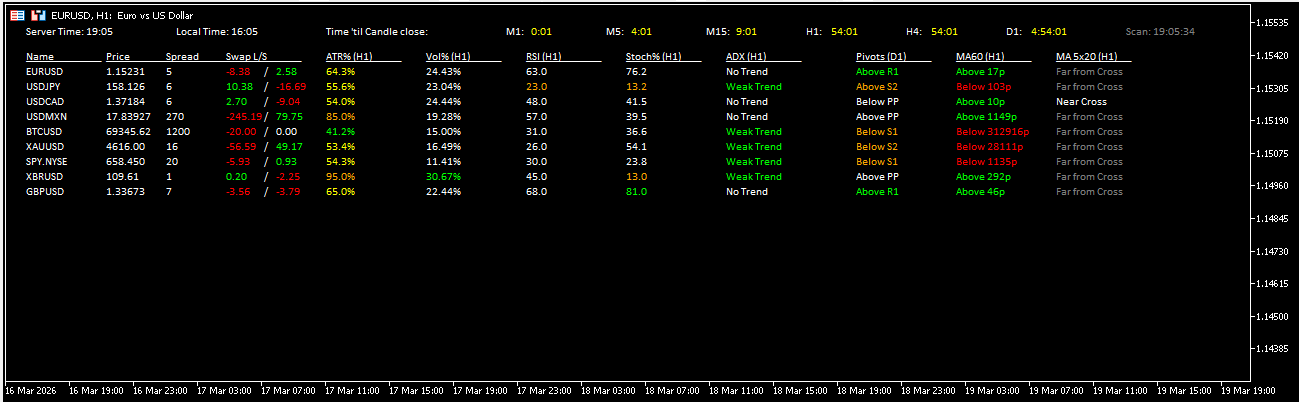
The FXTT MT5 Forex Scanner gives you a fast, single-screen market overview for MetaTrader 5. Instead of switching across many charts, you can monitor multiple symbols at once and spot momentum, trend strength, and overbought or oversold conditions in seconds.
This free indicator reads symbols from your Market Watch or from your own custom symbol list, then displays key data in a compact dashboard directly on your chart. At a glance, you can track RSI, Stochastic, ADX, ATR percentage, Volume percentage, Pivot context, moving average direction, and MA-cross status across your selected symbols. Refresh is timer-based, which keeps the panel responsive while limiting unnecessary resource usage.
A common workflow is to keep this scanner open on a dedicated chart while trading from your normal execution charts. The scanner helps you shortlist pairs with active conditions first; then you perform your deeper entry validation on the selected symbols. This approach saves time and helps maintain consistency when scanning broad watchlists.
This scanner is ideal for discretionary traders who monitor many symbols, for intraday traders who need quick context before execution, and for swing traders who want a structured top-down shortlist process. Treat scanner output as a filter, not an automatic entry trigger — entries still benefit from your normal confirmation process, market session context, and risk controls.
The FXTT MT5 Forex Scanner is completely free and open source. You can review the implementation details, follow updates, and better understand how the indicator computes and presents each signal block on the public GitHub repository.
Key Features
- 11 Data ColumnsPrice, Spread, Swap, ATR %, Volume %, RSI, Stochastic, ADX, Pivot Levels, MA direction, and MA Cross — all visible at a glance on a single dashboard.
- Auto-Refreshing PanelTimer-based refresh (default 60 seconds) keeps the panel current while limiting CPU and memory usage, even with large Market Watch lists.
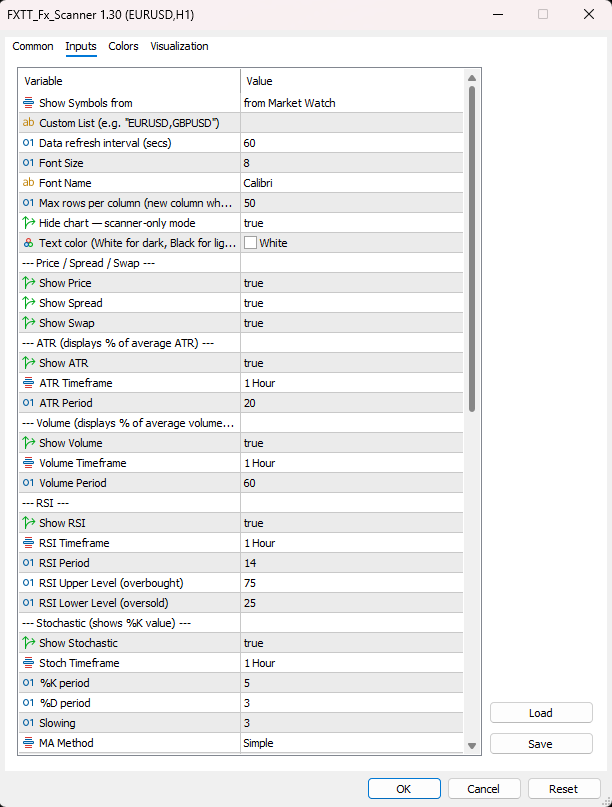
- Market Watch & Custom Symbol ListsScan all Market Watch symbols automatically, or restrict to a custom comma-separated list such as EURUSD, GBPUSD, USDJPY.
- Alerts with Push NotificationsBuilt-in alerts fire on RSI extremes, Stochastic extremes, and MA crossovers. Enable push notifications to receive signals on your MT5 mobile app.
- Independent Timeframe Per ColumnEach indicator column — RSI, Stochastic, ADX, ATR, Volume, MA, MA Cross — has its own independently configurable timeframe and period settings.
- Near-Cross DetectionWhen the fast and slow MAs are within the ATR-defined threshold, the MA Cross column flags a near cross before the crossover completes.
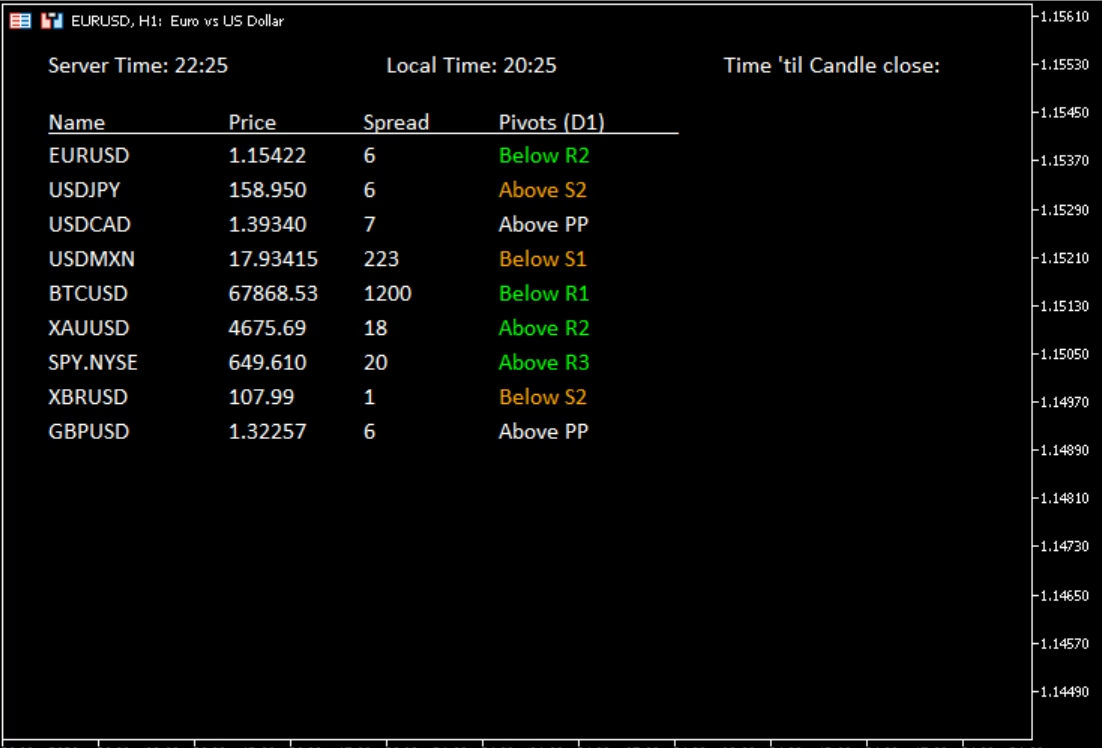
- Scanner-Only Display ModeEnable Hide Chart Elements for a clean black background with only the scanner panel visible. The original chart appearance is fully restored when the indicator is removed.
- Per-Symbol Alert CooldownConfigurable cooldown period per symbol prevents repeated alerts, reducing noise and keeping your attention on genuinely new signal events.
- Free and Open SourceCompletely free to download and use. The source code is publicly available on GitHub so you can review the implementation and follow updates.
Screenshots
Trader Reviews
Fatima Al-Zahrawi
Scans 28 pairs in seconds. I used to do this manually — never going back.
Mikael Lindström
Perfectly organised layout. The signal summary saves me a ton of time each morning.
Nguyen Thi Lan
Reliable signals and fast rendering. Would be great to add alerts for specific pairs.
Bernard Dupont
Write a Review
Frequently Asked Questions
- A free multi-pair forex scanner indicator for MetaTrader 5 that displays live RSI, Stochastic, ADX, ATR, Volume, Pivot, MA, and MA Cross data for all Market Watch symbols — or a custom list — on a single on-chart dashboard that auto-refreshes at a configurable interval.
- Yes. The FXTT Multi Forex Scanner is completely free to download and use. Click the download button on this page and install it in your MT5 platform.
- Download the file, copy the .ex5 file to your MQL5/Indicators folder (File → Open Data Folder → MQL5 → Indicators), restart MT5 or refresh the Navigator, then drag the indicator onto any chart.
- By default, all symbols visible in your Market Watch. Switch Show Symbols From to Custom List and enter a comma-separated list (e.g. EURUSD,GBPUSD,USDJPY) to restrict the scan to specific pairs.
- Yes. Enable Alert on RSI Overbought/Oversold and Alert on Stochastic Overbought/Oversold in the settings. Toggle Push Notifications to also receive alerts on your MT5 mobile app.
- When the fast and slow MAs are within the ATR-defined threshold, the MA Cross column flags a near cross before the crossover completes.
- Yes. You can attach the scanner to any chart on any timeframe. It reads data from its own independently configured timeframes regardless of the chart it runs on.
- This is the Hide Chart Elements feature. It sets a clean black background and hides all chart elements so only the scanner panel is visible. Set it to false to keep your existing chart appearance. When the indicator is removed, the original chart colors and settings are fully restored.
- Yes. Enable Alert Push Notify in the settings and ensure your MetaTrader 5 mobile app is connected to your account. Alerts for RSI extremes, Stochastic extremes, and MA crossovers will be sent as push notifications.
- The scanner refreshes on a timer (default 60 seconds) rather than on every tick, keeping CPU and memory usage low even with many symbols in Market Watch. Increase the timer interval if you notice any performance impact.
- Yes. The indicator runs normally on a VPS and continues scanning and alerting as long as MetaTrader 5 is running, with no user interaction required after initial setup.
- Yes. The Multi Forex Scanner is a visual-only indicator. It does not place orders, modify positions, or interact with any Expert Advisors running on the same or other charts.
- This version is built specifically for MetaTrader 5. The .ex5 file is not compatible with MT4.
Setup Guide
Download the file
Click the download button on this page to get the free indicator file.Open Data Folder
In MetaTrader 5, go to File → Open Data Folder.Copy the indicator
Navigate to MQL5 → Indicators and copy the .ex5 file into that folder.Restart or refresh
Restart MetaTrader 5, or right-click the Navigator panel and select Refresh.Open any chart
Open any chart — the scanner reads all Market Watch symbols regardless of the chart's symbol or timeframe.Attach the indicator
Find FXTT_Fx_Scanner under Indicators in the Navigator and double-click or drag it onto the chart.Configure settings
Configure timeframes, columns, font size, and alert settings in the inputs panel.Enable scanner-only mode (optional)
Enable Hide Chart Elements for a clean scanner-only view with a black background.Scanner is ready
The scanner panel appears immediately and auto-refreshes on the configured timer interval. For best results, attach it to a dedicated chart window and dock or minimise it so it runs independently while you trade from other charts.
Changelog
- Initial public release.
- 11 data columns: Price, Spread, Swap, ATR %, Volume %, RSI, Stochastic, ADX, Pivot Levels, MA direction, and MA Cross.
- Market Watch and Custom List symbol sources.
- Color-coded RSI and Stochastic cells with configurable overbought/oversold thresholds.
- Independent timeframe configuration per indicator column.
- Configurable alert system for RSI, Stochastic, and MA Cross signals with push notification support.
- Per-symbol alert cooldown to prevent repeated alerts.
- Near-cross detection using ATR proximity between fast and slow MAs.
- Multi-column layout with configurable max rows per column.
- Font size scaling — entire panel scales proportionally.
- Ghost-row cleanup when symbols are removed from Market Watch.
- Full chart restoration (colors, mode) on indicator removal.
More Free Tools
Free Download
Free tools are analysis aids and utilities. They do not guarantee trading results. Always test in a demo account before applying to live markets.