MT5 & MT4 trendline EAYour lines, executed automatically.
TrendlinePRO turns drawn trendlines into MT5 and MT4 trading rules. Set take-profit, stop-loss, entry mode, breakeven, and volume on the chart. The EA monitors the level and executes when price reaches it.
Test the demo safely
The demo executes orders on your broker's demo account. Test the exact symbol before going live.
- Install on a demo account
- Draw one line
- Confirm order and protection
- Check the Experts log
One-time license · MT5, MT4, or the TrendlinePRO MT4 + MT5 pair · 12 months of updates and support per platform · 60-day money-back guarantee
What TrendlinePRO does
TrendlinePRO is a MetaTrader 5 and MetaTrader 4 Expert Advisor (EA) that turns drawn trendlines into live execution rules. Draw a line on the chart, configure take-profit and stop-loss zones, choose how the trade triggers, and set automatic protection. The EA monitors the level and executes your plan without you sitting at the screen.
TrendlinePRO does not generate signals or use black-box logic. Your analysis stays yours. It handles execution.
Draw the line and set the trade. TrendlinePRO watches it.
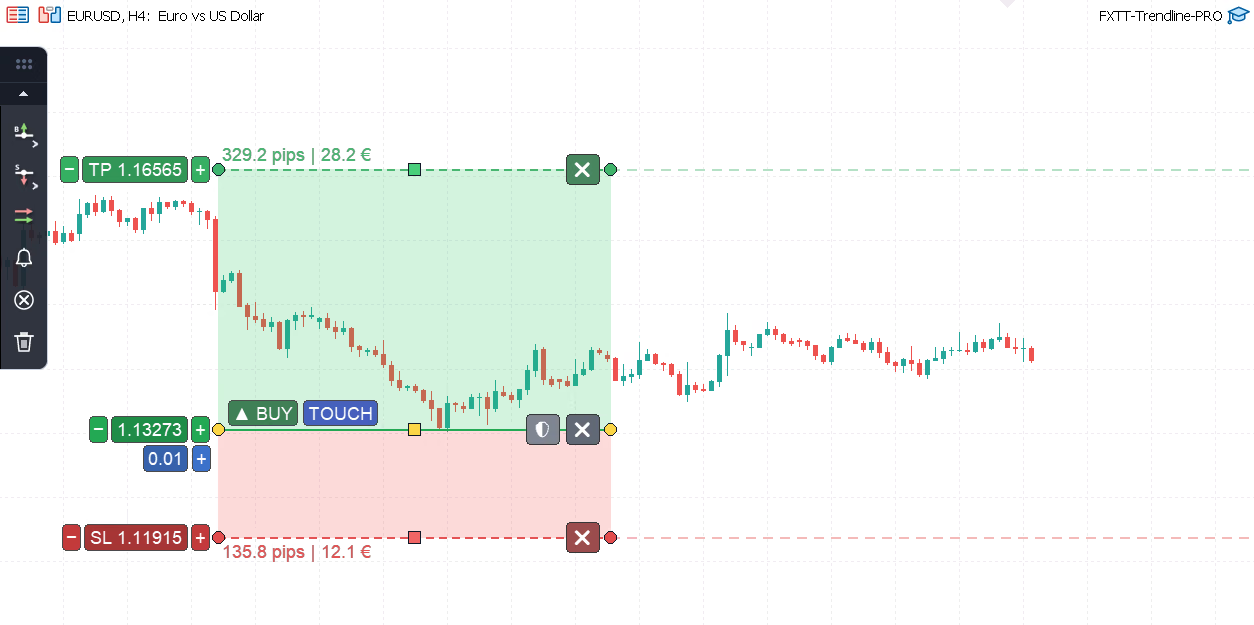
You drew the level. TrendlinePRO can watch it.
Who gets the most from TrendlinePRO
TrendlinePRO fits discretionary traders who make their own chart decisions and want execution to follow the plan, not their reaction time. If you trade trendlines, support/resistance levels, range breakouts, channels, or diagonal structures, MetaTrader can monitor the rule while you are away. TrendlinePRO does not generate signals, scan the market, predict direction, or promise a win rate. It is not for traders who want an autonomous strategy. It is for traders who want their setups executed, alerted, protected, and logged consistently. It works well for traders with limited screen time, swing traders planning overnight or multi-day setups, intraday traders who need candle-close breakout confirmation, multi-chart traders monitoring several instruments, and cautious buyers who want to verify alert mode before live execution. Support is available in English and Spanish.
Common use cases:
- Execute MT5 and MT4 trendline breakouts without sitting at the screen for the trigger
- Require candle-body or full-bar confirmation to filter wick-based false entries
- Plan complete risk/reward with visual TP/SL zones, live pip labels, and money-value estimates
- Validate a level in alert-only mode before enabling live trade execution
- Move stops to breakeven and activate trailing protection automatically after entry
- Set up OCO buy-above / sell-below pairs. One trigger removes the other line.
- Ladder out with partial-close lines at predefined price levels
- Monitor forex, gold, indices, commodities, and CFD setups across multiple charts without extra screen time
- Test complete trendline setups in Strategy Tester visual mode using saved chart templates
Full walkthrough
See TrendlinePRO in action
How it works
From a blank chart to a running setup
Build a tested trendline rule in five steps.
- 01Attach and test safely
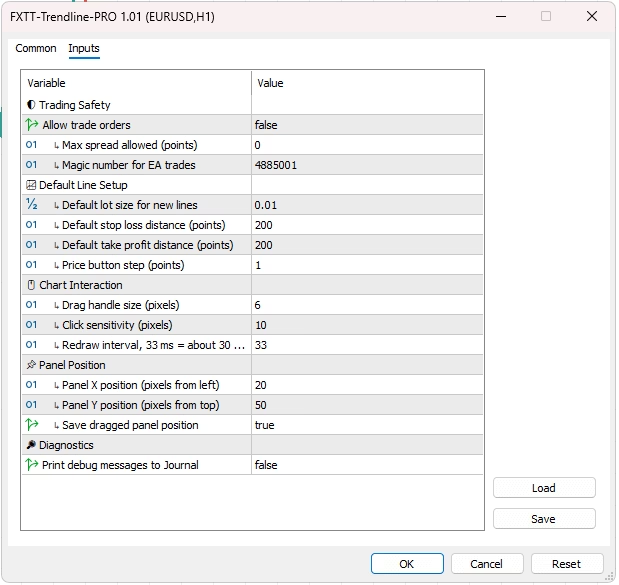
Before clicking OK, set TradingEnabled=false. Then draw and adjust lines, trigger test alerts, and explore the full workflow. Live orders stay disabled while this setting is false.
- 02Build the full trade plan on the chart
Choose the line type: buy, sell, breakout, alert, OCO, close-all, or partial-close. Shape TP and SL zones, set per-line volume, and read pip and money-value labels in real time.
- 03Set the entry trigger
Tick-cross for speed. Candle-body breakout for closed-bar confirmation. Full-bar breakout when you need both the open and close to clear the line. Each mode shows a visual cue on the chart.
- 04Add trade management before price arrives
Configure auto-breakeven trigger and lock-in pips, trailing stop, spread limit, and magic number. Everything is visible and set before the level is reached.
- 05Verify on demo, then enable
Test alert-only mode. Review execution logs. Run a small demo order on your broker. When behavior matches the plan, enable live execution and walk away.
Get Started TrendlinePRO
One-time license · Choose MT4 or MT5 · 12 months of updates and support
TrendlinePRO MT4 + MT5
- MT4 licence, unlimited MetaTrader 4 accounts you control.
- MT5 licence, unlimited MetaTrader 5 accounts you control.
See license terms
- One-time purchase. No subscription, no machine activation lock.
- 12 months of minor updates and direct support per platform, starting on the purchase date. Community support afterwards.
- Each platform is released on its own schedule, so the MT4 and MT5 version numbers may differ. You always get the current paid build for each platform.
- Major upgrades may be priced separately.
- The 60-day money-back guarantee covers the order as a whole. A refund revokes both platform downloads; there is no partial single-platform refund.
What the free demo lets you test
The free Trendline PRO build has different limits from the paid EA. Use it to try the full chart workflow before buying.
- It requires a demo account. The free build rejects live accounts.
- Up to 2 lines total at once, single and OCO lines combined
- The demo executes orders on demo accounts. Test the exact broker and symbol before live use.
- The full interactive chart panel and alert workflow are identical to the paid build
- The demo does not expire. Its only limits are the demo account requirement and the two-line cap.
Set up push alerts on your phone
- In MetaTrader, open Tools → Options → Notifications
- Tick Enable Push Notifications
- Enter your MetaQuotes ID, found in the MetaTrader mobile app under Settings → Messages
- Click Test in the terminal. A notification should reach your phone within seconds.
Alert didn't fire? Check these first
- Algo/AutoTrading is enabled in the terminal toolbar
- The EA's trading-enabled or alert-mode input is set the way you expect
- The symbol is visible and permitted in Market Watch
- Notifications are enabled with the correct MetaQuotes ID
- The Experts/Journal log to see whether the condition was met
One-time payment, no subscription. 12 months of updates and support. 60 days to ask for your money back. See license terms
What you set on the chart
Entry triggers and when the trade fires
Choose one of three entry triggers for each line. Use a tick cross when speed matters. Use closed-candle confirmation when the candle body needs to confirm the move.
- Touch / Cross: mid-price crosses the line on any tick. This is the fastest trigger.
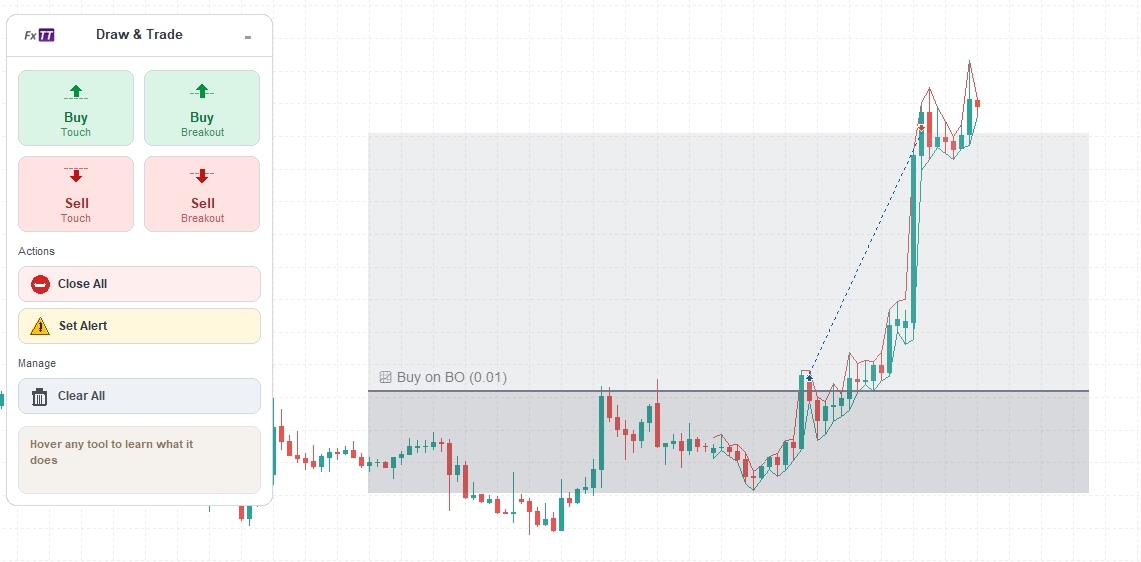
- Breakout: candle opens on one side and closes on the other (body confirmation only, wicks excluded)
- Full-Bar Breakout: both the open and the close must be beyond the line for stricter validation
- Two-candle visual glyph on selected breakout lines shows the exact trigger rule at a glance
- Set a trigger mode for each line. Different setups on the same chart can use different modes.
Each trigger mode displays a visual cue directly on the chart.
| On the chart | Trigger | What opens the trade |
|---|---|---|
| Buy lines | ||
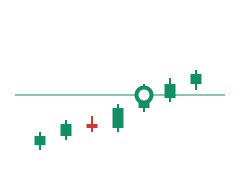 | Buy on touch | Mid-price crosses the line upward and the buy opens. Tick-based, no waiting for the candle to finish. |
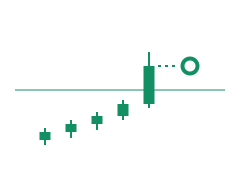 | Buy on breakout | The candle has to open below the line and close above it. A wick through the level opens nothing. An optional minimum distance in pips makes the close clear the line by a margin. |
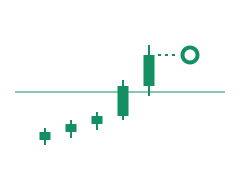 | Buy on full-bar breakout | Stricter than a plain breakout: open and close both have to sit above the line, which filters out bars that straddle it. |
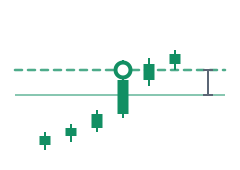 | Buy on distance breakout | No waiting for the close at all. Price has to run a set distance above the line, and the buy goes in the moment it does. |
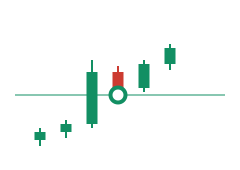 | Buy on pullback | A closed breakout above the line arms it. Within the next few candles (two by default) a wick back down to the line opens the buy; you can require that candle to close above the line instead. |
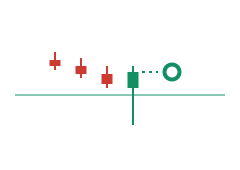 | Buy on false breakout | The candle opens and closes above the line, but its wick pierces below and comes back. The buy goes in at the close, once the level has held. |
| Sell lines | ||
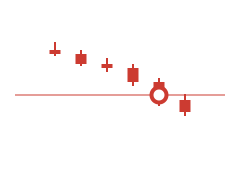 | Sell on touch | Price crosses the line downward and the sell opens, on the tick rather than the close. |
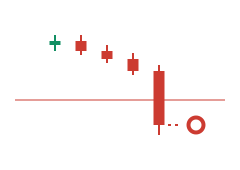 | Sell on breakout | The candle opens above the line and closes below it before the sell goes on. The same optional pip margin applies. |
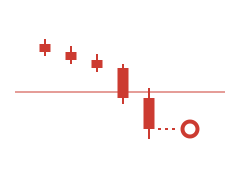 | Sell on full-bar breakout | Open and close both have to finish under the line, so a bar that only dips below it is ignored. |
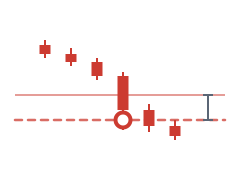 | Sell on distance breakout | Price has to run the set distance below the line, and the sell goes in intrabar, the moment the distance is covered. |
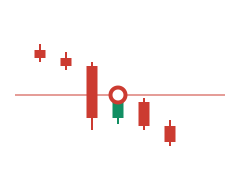 | Sell on pullback | Once a candle has closed below the line, a wick back up to it opens the sell inside the same window of candles. |
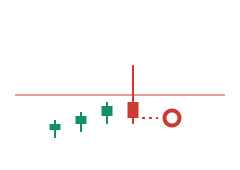 | Sell on false breakout | The candle opens and closes below the line while its wick spikes above it. The sell goes in at the close. |
| Both sides at once | ||
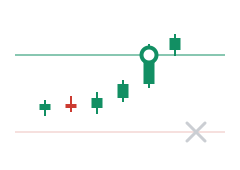 | OCO pair | A buy line below and a sell line above, linked. Whichever side triggers first opens the trade; the other line is removed automatically. |
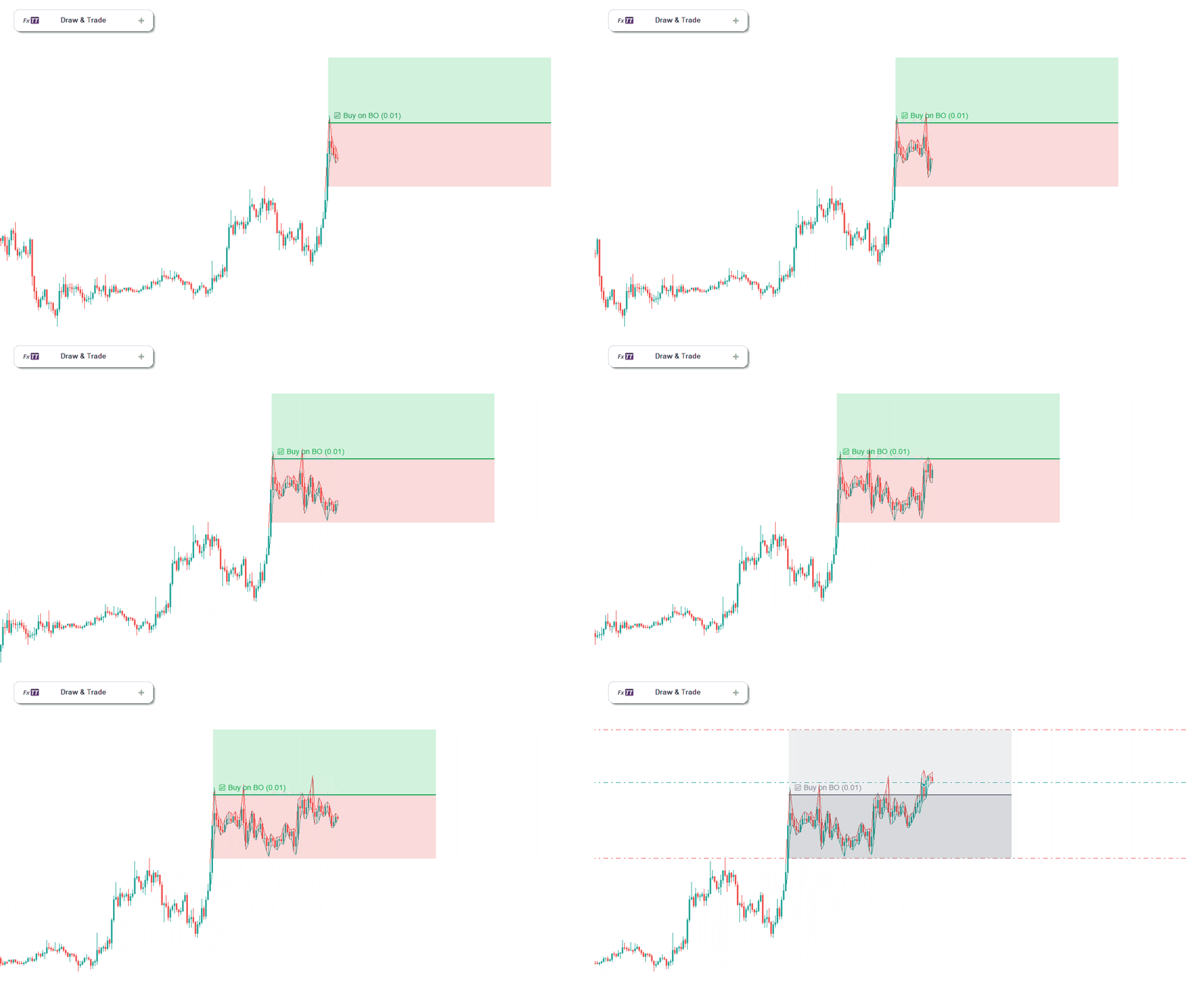
Visual risk planning with TP/SL zones and live labels
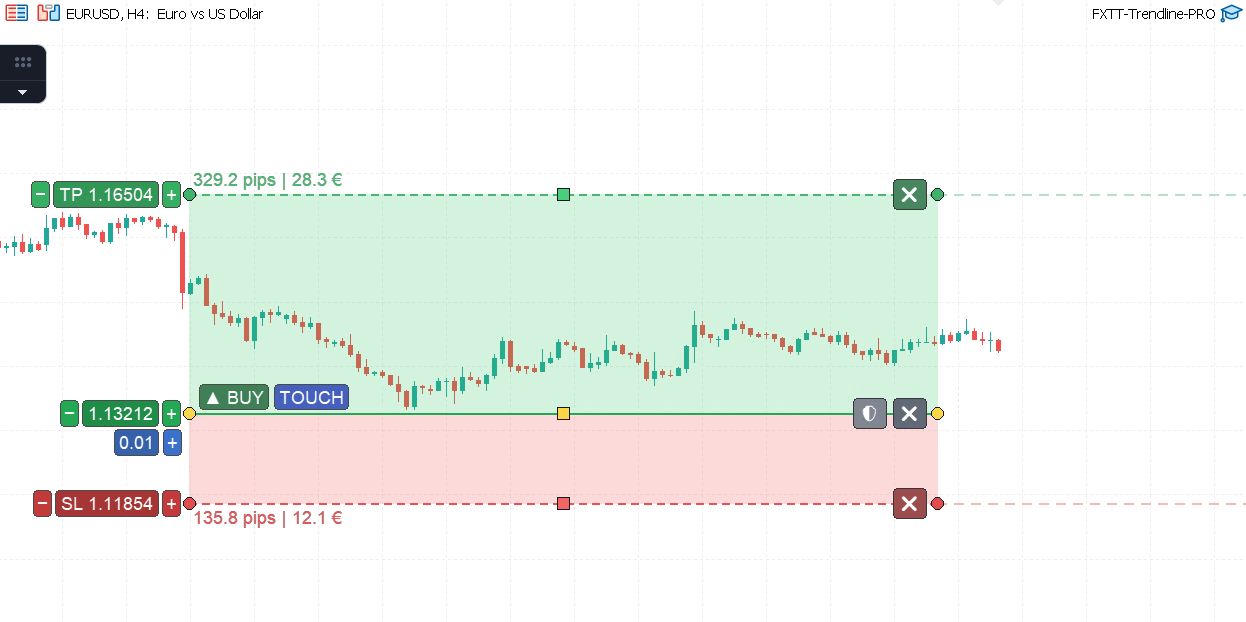
TP and SL zones are drawn on the chart. Pip distance and estimated money value update as you drag. Make the risk/reward decision before placing an order.
- TP zone renders above (buy) or below (sell); SL zone on the opposite side
- Live labels show pip distance and estimated monetary value while you drag
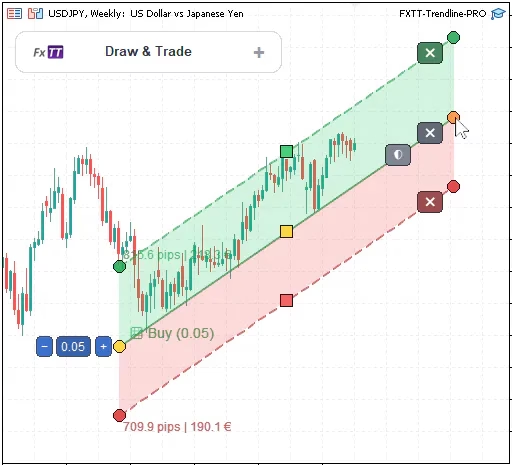
- Zones can be horizontal or sloped to follow wedges, channels, and diagonal structures
- Sloped zones display a pip range across the candle window (e.g., '38.9 to 21.3 pips')
- Toggle TP and SL independently per line with one click
Automatic trade protection
Once a trade is open, TrendlinePRO can manage the stop. Configure auto-breakeven and trailing stop on the chart before entry. You do not need to intervene after the position opens.
Auto-breakeven
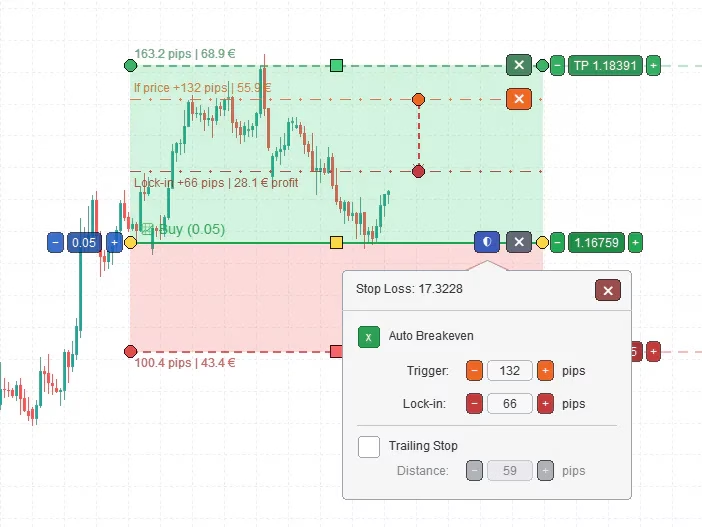
Set auto-breakeven before entry. Choose the trigger pips and lock-in buffer. TrendlinePRO moves the stop when price reaches the threshold.
- Trigger distance: the profit in pips that activates the breakeven move
- Lock-in buffer: where the stop is moved after trigger (entry plus the buffer)
- Both levels appear as draggable lines on the chart. The trigger is orange and the lock-in line is dark red.
- Configure each line separately. Multiple active trades can use different breakeven rules.
- Breakeven trigger is capped at the TP distance when TP is enabled
Trailing stop
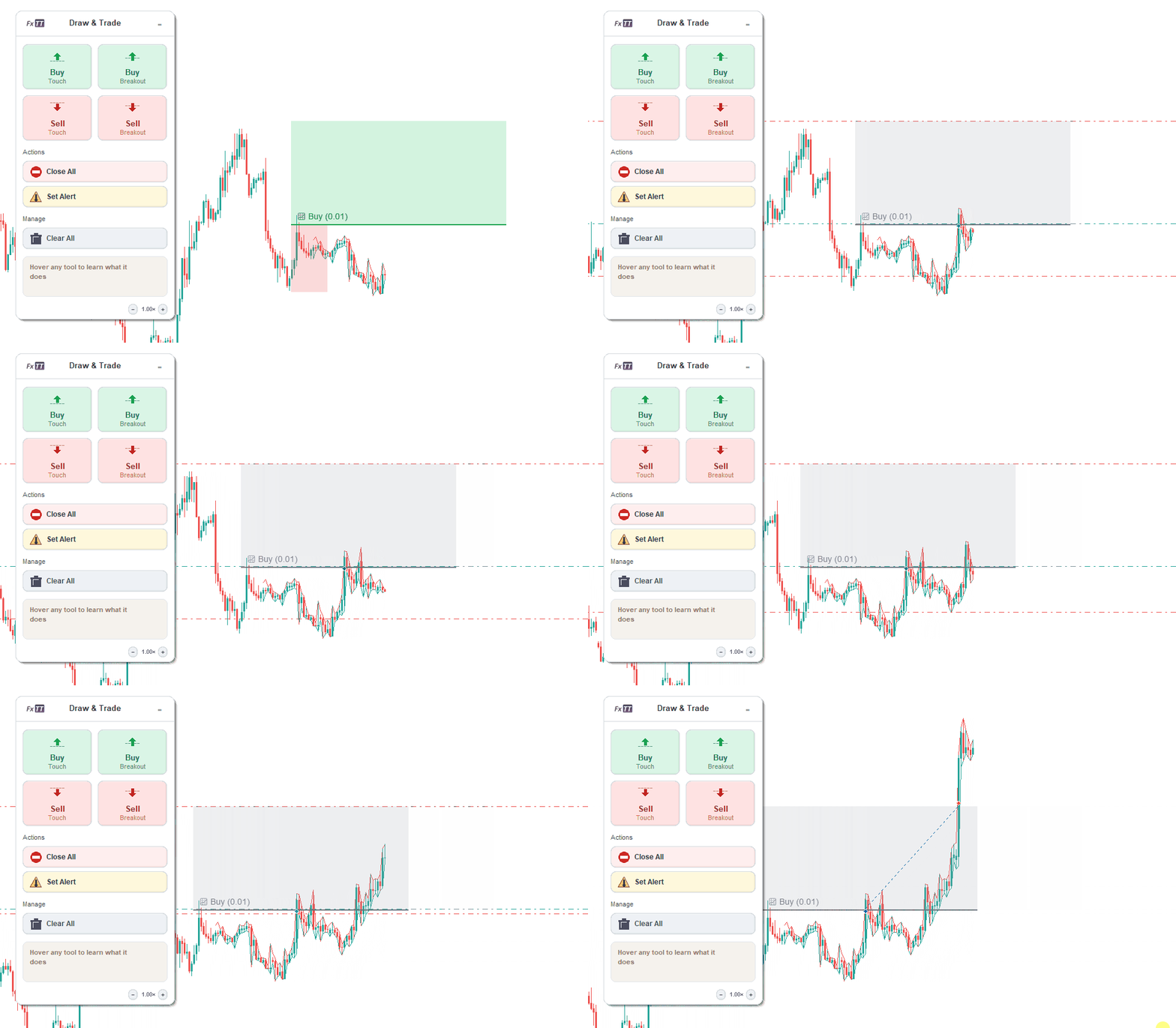
It activates after a configurable start distance and follows price at your set gap. It can run with auto-breakeven on the same line.
Advanced tools: OCO, partial close, and alert lines
Trailing stop, OCO pairs, and close lines define the full trade lifecycle on the chart before price arrives. No improvised exit decisions after the position opens.
- Trailing stop: activates after a start distance in profit, follows price at your configured gap
- OCO pairs link a buy-below and sell-above line. One trigger cancels the other.
- Close All line: exits every matching position when price reaches the level
- Partial Close line: specify a volume to reduce position size at a predefined level
- Multiple close lines can stack for staged exits at different price levels
Alert mode
Use alert mode to test a line without execution risk. Switch to live entry only after the alert timing matches your plan.
- Any line type can use alert-only mode. MetaTrader sends a push notification and no order is sent.
- Alerts use the same tick-cross, breakout, and full-bar breakout logic as live entries
- Use alert mode on demo to validate line placement, symbol behavior, and crossing timing
- Switch a validated alert line to live execution without redrawing or repositioning
Test the rule before you trade it
TrendlinePRO gives you separate controls for testing and execution. Set TradingEnabled=false or use an Alert line before testing a setup. Broker-side rejections are written to the MetaTrader Experts log with the reported condition.
- Disable trade orders while testing
Set TradingEnabled=false, draw lines, and test alerts before allowing any live order. Enable execution only when the setup and log match your plan.
- Alert-only line type
Any line can run in alert mode. It sends a MetaTrader push notification using the same tick-cross, breakout, or full-bar logic as a live entry without placing an order.
- Pre-order broker validation
Spread guard, margin check, lot-step normalization, filling-mode detection, and stop-distance validation run before every execution attempt. Rejections appear in the MT5/MT4 Experts log.
- Duplicate-entry protection
Same-condition repeat entries are blocked per line. Independent setups on the same chart stay independent and do not interfere.
- Reload persistence
Dual-layer storage uses GlobalVariables for live-chart reloads and mirrors chart objects for template and Strategy Tester portability.
- Magic number separation
Assign a unique magic number per chart or symbol to keep TrendlinePRO positions separate from manual trades and other EAs running simultaneously.
Run the alert-only workflow first
Draw a line, set it to Alert mode, and confirm the notification fires at the exact tick-cross or candle-close. Then place a small demo order to verify broker-specific behavior. Enable live execution only when the log and alerts both match your plan.
What execution feedback looks like
- Alert fired: EURUSD M15 full-bar breakout confirmed
- Order blocked: spread exceeds InpMaxSpreadPoints
- Order rejected: stop level too close (XAUUSDm)
- Trading disabled: signal logged, no order sent
Example log formats. Your broker's exact wording may vary.
Recommended testing workflows
Step-by-step workflows for the most common testing scenarios. Start with the first; move to the others once the basics behave as expected.
- Alert-only validationStart here. Verify crossing logic and timing before enabling execution.
- Set TradingEnabled=false when attaching TrendlinePRO
- Draw an alert line on the level you want to monitor
- Choose tick-cross or candle-close confirmation mode
- Wait for the MT5/MT4 push notification at the exact level
- Move to a small demo order only after the alert behavior looks correct
- Risk-defined breakout entryFor discretionary traders who want repeatable, rule-based breakout execution.
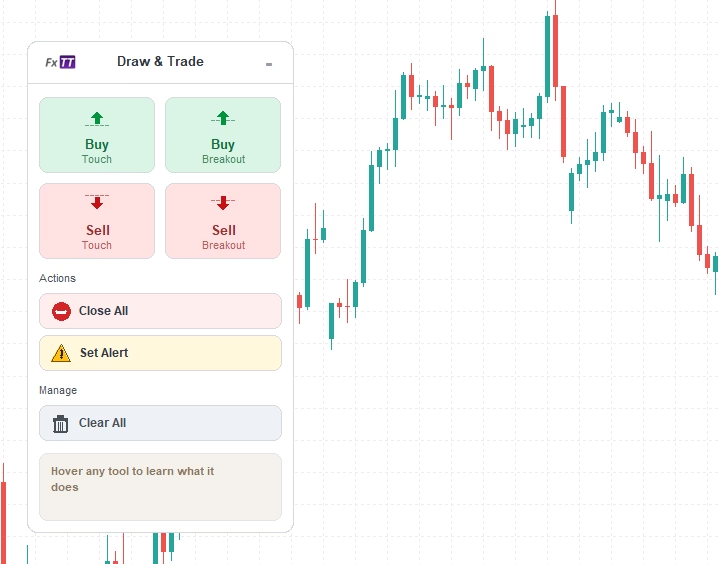
- Add a Buy BO or Sell BO line from the chart panel
- Drag endpoints onto the market structure you want to trade
- Shape TP and SL zones. Read the live pip and money-value labels
- Set per-line volume and configure auto-breakeven before the level is reached
- Verify candle-close confirmation on demo, then enable live execution
- Two-sided OCO breakoutFor range setups where either side can trigger and the other should be cancelled.
- Create a linked buy-below and sell-above OCO line pair
- Drag both lines to set the intended levels
- When one triggers, the paired line is automatically removed
- Test on a fast-moving demo chart before using in live markets
- Check the log to confirm only one order opened
- Multi-chart monitoringFor traders managing several instruments or timeframes without extra screen time.
- Attach one EA instance per chart with a unique magic number per instrument
- Draw setups on each chart and run alert-only mode per chart first
- Verify close-line behavior per instrument before scaling to more charts
- Confirm logs are clean across all open instances
- Scale to additional charts only after the first setup runs as expected
- Prop-firm and challenge-account testingFor rule-sensitive accounts where a single misstep ends the challenge.
- Run on demo with the same lot sizes and risk settings as the challenge account
- Verify max spread limits, lot step, and stop-distance rules with your broker
- Use alert-only mode first on any unfamiliar symbol or timeframe
- Enable execution only for setups you have already verified on demo
- Do not enable OCO or close lines until you fully understand their behavior on your broker
Works on Forex, Gold, Indices, Commodities, and CFDs
TrendlinePRO uses standard MetaTrader execution functions, so it is not tied to a specific broker or market. The hero screenshot shows it on US500. Each broker uses different symbol names, lot steps, filling modes, spread behavior, minimum stop distances, and trading hours. Test the exact broker and symbol on demo before going live. The Safety section shows the log messages you may see when a broker rule conflicts with your settings.
| Market | Example symbols | Verify on demo |
|---|---|---|
| Forex | EURUSD, GBPUSD, USDJPY | spread limits, lot step, stop level |
| Gold | XAUUSD, GOLD, XAUUSDm | contract size, stop distance, filling mode |
| Indices | US100, NAS100, GER40, DAX | symbol suffix, minimum volume, trading hours |
| Commodities | USOIL, UKOIL | price precision, stop level, session gaps |
| CFDs | Broker-specific symbols | filling mode, margin, min/max volume |
TrendlinePRO can support disciplined execution on prop-firm and challenge accounts, but it does not bypass firm rules or guarantee compliance. Verify every risk parameter, spread limit, and lot-step rule on demo before using a live challenge account.
Technical specifications
| Platform | MetaTrader 5 + MetaTrader 4 |
| Account types | Hedging and retail netting |
| Entry modes | Tick-cross, candle-body breakout, full-bar breakout |
| Rendering | Custom ARGB canvas overlay, ~30 FPS |
| Persistence | Dual-layer (GlobalVariables + mirrored chart objects) |
| Strategy Tester | Template-based visual mode only (no live drawing during test) |
| Protection | Auto-breakeven + trailing stop, per-line |
| Undo / Redo | Ctrl+Z / Ctrl+Y |
| Accounts per licence | Unlimited (no machine activation lock) |
| Updates | 12 months |
| Guarantee | 60-day money-back |
Automated execution does not remove market, slippage, spread, margin, broker, or configuration risk.
Test all setups on demo before enabling live execution.
Screenshots
Trader Reviews
- ✓ Verified
Marco Ferretti
Been running this on EURUSD M15 for three months. I draw the line the night before and it opens on the candle close instead of me chasing the move.
- ✓ Verified
Jan van der Berg
Settings are documented properly and the install guide matched what I saw in MT5. Support answered my questions same day.
- ✓ Verified
Rodrigo Alves
Does what it says on the chart. The demo only allows two lines though, so I could not test my full setup before buying.
Sophie Müller
I was sceptical, so I ran it in alert-only mode for two weeks before letting it place anything. It fired where I drew the line every time.
- ✓ Verified
James Whitfield
The TP and SL zones show the pip and money value before the trade opens, which is the part I actually wanted.
- ✓ Verified
V. R. Ramanan
Excellent product with amazing support. I am extremely satisfied. The developer is always helpful and created a new version with a new feature I requested. Lots of thanks to Carlos. Already I recommended to 3 of my friends. They are also very happy. :)
- ✓ Verified
Nathan W.
For the price of the EA/Indi vs the functions it can perform at this price point, I'm extremely satisfied. Thanks
- ✓ Verified
Sebastian R.
Really a very helpful EA thank you
- ✓ Verified
Jason S.
excellent
- ✓ Verified
Peter H.
If your a trendline trader this is the best EA you can get. There is nothing it doesn't cover. And affordable too. So just buy it and try it. I tend to use it with fib, fib extensions and s/r with good results. Don't forget it's up to you to select which trade you are going to take. There is no holy grail only assistance and this is the one for me. Thanks to Carlos the Author who is very helpful too.
- ✓ Verified
Thomas M.
Very usefull, you can build up an entire semi-auto strategy with this EA. With Trailing stop and breakeven, that will be perfect. I mainly use it with BoFB strategy on indices supports and a shift value high enough not to trigger "false false breakout", it performs very well 👍
- ✓ Verified
Efrain R.
Osom EA, exceeds by far the price you pay for it!
- ✓ Verified
Sri R.
Great EA, very useful for S&R and pattern maniac like most of us.
- ✓ Verified
Josko L.
Awesome EA :)
- ✓ Verified
Andreas D.
Very good EA! Thank you...
- ✓ Verified
Petter R.
I great indicator for taking and managing trades.
Write a Review
Sign in to receive a Verified Purchase badge if you own this product.
Frequently Asked Questions
- Yes, when TradingEnabled and MetaTrader Algo Trading are enabled. To test without orders, set TradingEnabled=false or use Alert lines.
- Semi-automated means you choose the setup. You place the entry line and TP/SL, choose the position size, and enable trading when you are ready. Trendline PRO monitors price and executes the rule you set. It does not decide when to trade.
- Trendline PRO is an MT5 trendline EA for user-defined execution rules. It does not generate signals, predict market direction, or select trade opportunities. The analysis and decision remain with the trader.
- A cross line triggers when the midpoint market price crosses the line. It is tick-based and immediate. A breakout line waits for a closed candle. A buy breakout needs a completed candle that opened below the line and closed above it. This helps avoid false triggers from wicks that retrace before the close.
- Yes. Alert lines fire an MT5 or MT4 alert when the crossing condition is met, without sending orders. It is a practical starting point for verifying line placement, tick-cross rules, and candle-close breakout behavior before enabling live execution. Alert-only is also a permanent configuration, not just a trial step: a paid licence can sit on a live chart with TradingEnabled=false for as long as you want. The free build attaches to demo accounts only, so alert-only on a live chart needs the paid licence.
- Trendline PRO reports the rejected order condition in the MetaTrader Experts or Journal log, such as invalid stops, spread, volume, filling mode, or margin issues. Test the exact symbol on demo first so broker compatibility problems are visible before live trading.
- Yes. Trendline PRO is designed to prevent repeated entries from the same active line condition. Use separate lines and magic numbers when you intentionally want independent setups on the same chart or symbol.
- Yes. Demo testing is the recommended first workflow. Set TradingEnabled=false, verify alert-only mode, test a small order on your broker only after enabling demo execution, review logs, then decide whether live execution fits your process.
- Yes. TP and SL zones can be drawn directly on the chart and applied to the entry when trading is enabled. Zone distances display as pip and money value labels before the trade triggers, so the risk/reward is visible on the chart before entry.
- Yes. TP and SL endpoint offsets are independent, so zones can follow angled chart structures such as rising support or falling resistance. They are not limited to flat horizontal levels.
- Yes. Auto-breakeven uses a trigger distance and a lock-in distance, both visible and draggable on the chart. When price reaches the trigger, the stop is moved to the lock-in level. The trigger is automatically capped at the TP distance if TP is enabled.
- Yes. Trailing-stop protection is configured per setup with start distance, step size, and trail distance. Once the trade moves the start distance into profit, the trailing stop activates and follows price according to the configured values.
- Yes. Close lines support 'Close All' or a numeric partial volume. Partial volume follows the symbol's minimum, maximum, and step rules. Multiple close lines can be placed at different price levels for staged partial exits.
- If the current spread exceeds the configured MaxSpreadPoints limit at the moment of execution, the order is blocked. The rule remains active and will attempt execution on the next tick if conditions are still met and spread is within the allowed limit.
- Trendline PRO works through standard MT5 trade functions and is not broker-specific. However, execution behavior depends on broker conditions including spread, slippage, execution mode, and allowed filling types. Always test on a demo account with your specific broker before going live.
- Yes. Attach the EA to each chart independently. Use a unique magic number per chart or symbol to separate positions and close-line behavior across multiple instruments running simultaneously.
- Most breakout EAs run a fixed built-in strategy. Trendline PRO is an execution assistant. You draw each setup, position the line, set TP/SL and volume, and choose alert or trade mode. The EA executes the rule you set. It does not contain an automated trading strategy.
- Yes. Trendline PRO is available for both MetaTrader 5 and MetaTrader 4.
- Yes. Each line has its own TP, SL, lot size, and order type. Buy and sell entries can be active on the same chart at the same time. They operate independently. The OCO button creates linked buy-below and sell-above lines.
- Trendline PRO can work on forex, gold, indices, commodities, and CFDs when your broker's symbol rules allow it. Test symbol suffixes, lot step, filling mode, stop distance, spread, and trading hours on demo before live trading.
- MetaTrader Strategy Tester cannot use drawn chart objects in non-visual or optimization mode. Those modes have no chart or chart events, so lines cannot trigger. To review a setup visually:
- Draw and configure your lines on a live or demo chart.
- Save the chart as a template (right-click the chart → Template → Save Template).
- Open Strategy Tester on the same symbol and period.
- Switch Strategy Tester to Visual mode.
- Load your saved template onto the test chart, then run.
- Trendline PRO can support disciplined prop-firm challenge testing, but it does not bypass firm rules or guarantee compliance. It has no built-in news filter and no drawdown stop, so account-level risk stays your job. Before using it on a challenge account:
- Confirm that your firm's policy allows an EA that trades from lines you draw and trigger. Policies vary by firm and change over time. Our prop-firm compatibility notes cover FTMO, MyFundedFX, E8 Funding, and The Funded Trader, but only your firm's current rule book decides.
- Trendline PRO does not guarantee rule compliance. You must verify eligibility.
- Apply the same disconnect and reload caveats as with any account. The EA cannot monitor, alert, or manage trades while MetaTrader or the VPS is offline. An in-progress pullback line does not survive a reload.
- Yes. Attach the EA to each chart independently and use unique magic numbers to separate symbols, timeframes, and close-line behavior. Test one setup per chart first before scaling to a multi-symbol workflow.
- Set TradingEnabled=false in the EA inputs. Alert lines can then monitor the same crossing conditions without placing orders. MetaTrader Algo Trading must also be enabled before any live order can be sent.
- There are three ways to buy:
- Paid TrendlinePRO for MT4 on its own.
- Paid TrendlinePRO for MT5 on its own.
- The TrendlinePRO MT4 + MT5 pair for €79, a one-time purchase that delivers the paid MT4 build and the paid MT5 build as two separate platform licences.
- No. The paid download contains the compiled EX4 or EX5 file for the selected platform. The MQL source code is not included.
- Support covers installation, configuration, and bug reports by email and Telegram for 12 months. Paid bespoke development is not part of the licence. Feature requests are still welcome — send them to @fxtt_support on Telegram or support@forextradingtools.eu. Some do ship as new versions, as one reviewer on this page describes, but nothing is promised on timing or scope.
- Trendline PRO cannot monitor price, send alerts, place orders, or manage trades while MetaTrader or the VPS is offline. Every rule runs inside MetaTrader, so an overnight or multi-day setup needs the terminal running on a machine that stays awake: a VPS, or a desktop that never sleeps. A stop loss or take profit already attached to an open position sits with your broker and still triggers while you are offline; breakeven moves, trailing steps, close lines, and untriggered entry lines do not. Saved line state can restore when the chart reloads, but one state is not restored: a line in the middle of a pullback sequence (an armed breakout waiting for the pullback touch) loses that in-progress state on reload and needs a fresh breakout to re-arm. After reconnecting, verify every line, setting, position, and log entry before relying on live execution.
- The standard license covers unlimited MetaTrader accounts you control, demo and live, on the platform you bought. There is no machine activation lock, but the licence is for one user, so additional users or independent usage contexts require another license.
- Telegram @fxtt_support is the fastest channel; email support@forextradingtools.eu answers within 1–2 business days. Support is answered in English and Spanish. For a refund, email support@forextradingtools.eu within 60 calendar days of purchase with the subject line "Refund Request – [Order Number]". It is no-questions-asked: you do not have to justify the request, and we reply within 2 business days.
- Yes. The affiliate programme pays 30% of the net sale price on anything bought through your link, with a 30-day cookie window and monthly PayPal payouts once your balance passes €50. Details and application: forextradingtools.eu/affiliate.
Setup Guide
MetaTrader 5 setup
Requirements
MetaTrader 5 (any current build). MT5 Algo Trading must be enabled in the platform toolbar before orders can be sent. An active MT5 account (demo or live) with the symbols you intend to trade.Installation
Download the Trendline PRO file after purchase. Open MetaTrader 5 and go to File → Open Data Folder. Copy the EA file into the MQL5/Experts folder. Return to MT5 and press F5, or right-click the Navigator panel and select Refresh. Locate Trendline PRO under Navigator → Expert Advisors. Drag it onto the chart you want to manage. In the inputs dialog, set TradingEnabled = false for initial testing. Click OK. The chart panel and canvas overlay will appear.Recommended demo testing workflow
Attach the EA to a demo chart with TradingEnabled = false. Add an alert line and confirm the MT5 alert fires when price crosses it. Add a buy entry line, set a small lot size, add TP and SL zones. Enable trading in the EA inputs and confirm the order opens at the correct level. Test auto-breakeven: add breakeven protection and monitor stop movement after entry. Test a close line: confirm it closes the matching position when price crosses it. Test a breakout line: confirm it waits for a completed candle before triggering. Review all behavior across multiple scenarios before switching to a live account.
MetaTrader 4 setup
Requirements
MetaTrader 4 (any current build). AutoTrading must be enabled in the platform toolbar before orders can be sent. An active MT4 account (demo or live) with the symbols you intend to trade.Installation
Download the Trendline PRO MT4 file after purchase. Open MetaTrader 4 and go to File → Open Data Folder. Copy the EA file into the MQL4/Experts folder. Return to MT4 and press F5, or right-click the Navigator panel and select Refresh. Locate Trendline PRO under Navigator → Expert Advisors. Drag it onto the chart you want to manage. In the inputs dialog, set TradingEnabled = false for initial testing. Click OK. The chart panel and canvas overlay will appear.Recommended demo testing workflow
Attach the EA to a demo chart with TradingEnabled = false. Add an alert line and confirm the MT4 alert fires when price crosses it. Add a buy entry line, set a small lot size, add TP and SL zones. Enable trading in the EA inputs and confirm the order opens at the correct level. Test auto-breakeven: add breakeven protection and monitor stop movement after entry. Test a close line: confirm it closes the matching position when price crosses it. Test a breakout line: confirm it waits for a completed candle before triggering. Review all behavior across multiple scenarios before switching to a live account.
Changelog
MT4
- Added mobile push notifications for alert lines.
- Improved SL/TP rounding to valid broker tick increments.
- Added configurable breakout and false-breakout distance thresholds, set to zero by default.
- Fixed OCO lines moving together when dragging a line's body or middle handle: dragging either line now moves only that line's price, matching endpoint-drag behavior; peer endpoint times still stay aligned.
- Improved reliability of line dragging, OCO sync, and panel interactions.
- Fixed: slideout panel now closes reliably when you click outside it.
- Added direct whole-line dragging, including lines without SL/TP zones.
- Moving an OCO line now moves its paired line too, preserving spacing.
- Improved trade execution reliability, partial closes, and chart cleanup.
MT5
- kept the protection shield available after an entry triggers, allowing Auto Breakeven and Trailing Stop to be turned off or on for an open position (supports the rollover procedure: disable Trailing Stop, remove/restore SL in MT5, re-enable Trailing Stop)
- fixed: re-enabling Trailing Stop on a triggered line no longer resets its trigger state, which could otherwise let the line fire a second, unintended entry order while the original position was still open
- fixed: protection panel controls (checkboxes, +/- steppers, close button) on a triggered line's shield panel are now correctly hover/hit-testable, matching what is drawn
- Added an Intrabar Distance breakout mode with configurable trigger distance.
- Added configurable distance thresholds for breakouts and false breakouts.
- Fixed partial closes on netting accounts and added configurable order deviation.
- Added mobile push notifications for alert lines.
- fixed OCO lines moving together when dragging a line's body or middle handle: dragging either line now moves only that line's price, matching endpoint-drag behavior; peer endpoint times still stay aligned
- Added False Breakout entry condition and dedicated Buy/Sell sidebar tools.
- Added Buy/Sell Pullback tools, configurable pullback window, and pullback cues.
- Hardened spread guard, netting-account handling, entry SL/TP, auto-breakeven, and trailing-stop updates.
- Added free trial edition with demo-only, two-line, and no-trading restrictions; all interactive features remain available.
- Fixed split-anchor state on aggressive middle-drag at chart edges
- Added direct line-body dragging
- Improved no-zone/OCO usability
- Added body-hover highlighting for draggable line bodies
- Entry line labels now include trigger mode in text
- Added undo/redo shortcuts for line edits.
- Added Full-Bar Breakout trigger and configurable default breakout type.
- Added Full-Bar Breakout cue, trigger pill, and tooltip.
- SL/TP zone labels now show pips and money; risk/reward remains in entry-line status text.
- Replaced fixed floating panel with collapsible, edge-snapping icon sidebar.
- Fixed sidebar startup position, slideout close behavior, and stale event-consuming state.
- Added panel OCO button that creates linked entry lines
- Improved netting account support
- Added netting entry collision log
- Fixed historical-candle breakout arming and preserved full MT5 order ticket values.
- Migrated to iCanvas and improved panel and button visuals.
- Initial version.
Get Started TrendlinePRO
One-time license · Choose MT4 or MT5 · 12 months of updates and support
60-day guaranteePurchase options
Trading tools are analysis and execution aids. They do not guarantee profits. Always test with appropriate risk controls before live trading.