Trendline EA
Semi-Automated MT4/MT5 Trading Robot
Trendline EA is a semi-automated Expert Advisor for MetaTrader 4 and MetaTrader 5 that automates trade execution directly from trendlines — supporting breakouts, pullbacks, false breakouts, and alerts. No coding required.
Get Started Trendline EA
One-time license · MT4 & MT5
60-day guaranteeOne-time license · 12 months of updates and support
One-time license · 12 months of updates and support
What is the Trendline EA?
The FXTT Trendline EA is a semi-automated Expert Advisor for MetaTrader 4 and MetaTrader 5 that bridges the gap between manual chart analysis and automated execution. MetaTrader does not natively support trade placement directly from trendlines — this EA fills that gap entirely. Draw a trendline on any chart, assign an action command in the trendline name, and the EA monitors price around the clock. When price interacts with your trendline, it executes your predefined action — a buy, a sell, a close, or an alert — with no further input required. The strategy stays yours. The EA handles the execution.
Why Trendline EA
Draw-to-Execute
Draw a trendline, add a command in the name, and the EA executes your trade the moment price interacts with your level.
4 Trigger Events
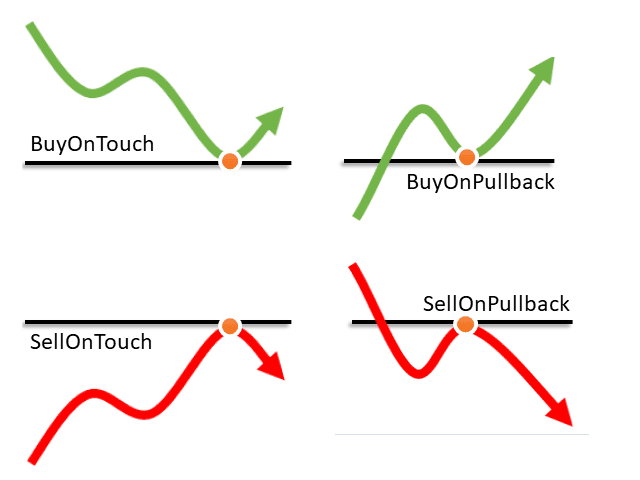
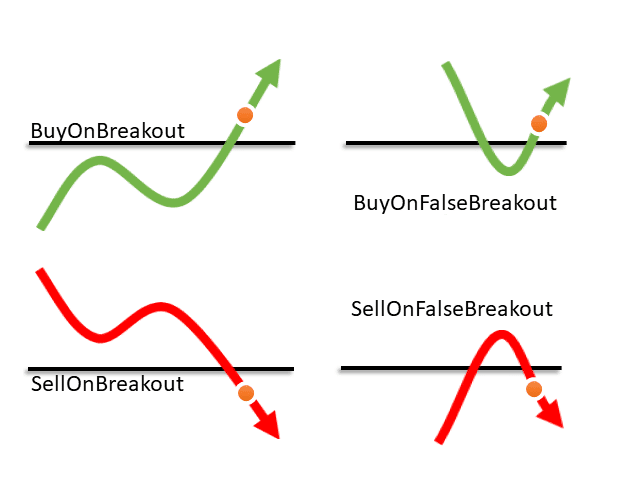
Touch, Breakout, Pullback, and False Breakout — four distinct price events, each triggering independent trade or alert actions.
Built-In Risk Management
Set stop loss, take profit, and lot size directly in the trendline command. Trailing stop and breakeven stop included.
Multi-Channel Alerts
Popup, email, push notification, and sound file alerts when any trendline event fires — trade or alert-only.
4 Supported Trigger Events
Touch
Execute when price reaches the trendline from either direction.
Breakout
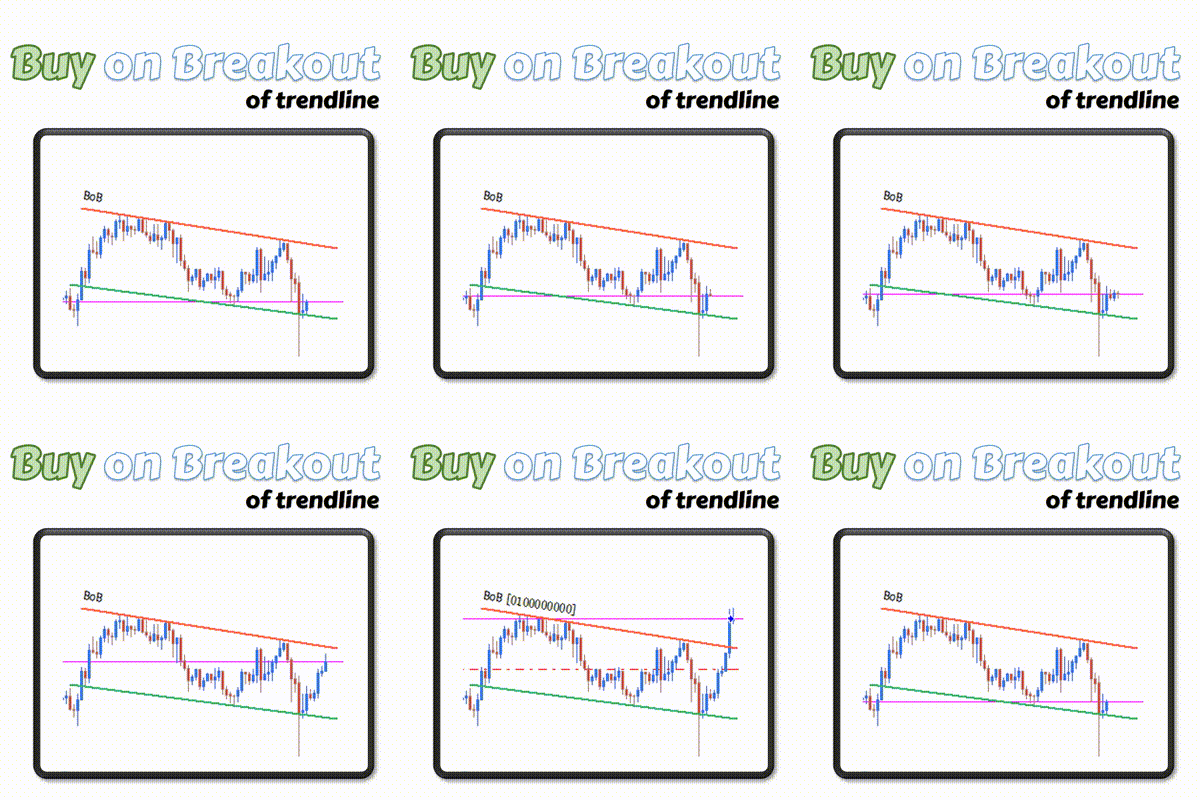
Execute when price closes or moves beyond the trendline by a defined distance.
Pullback
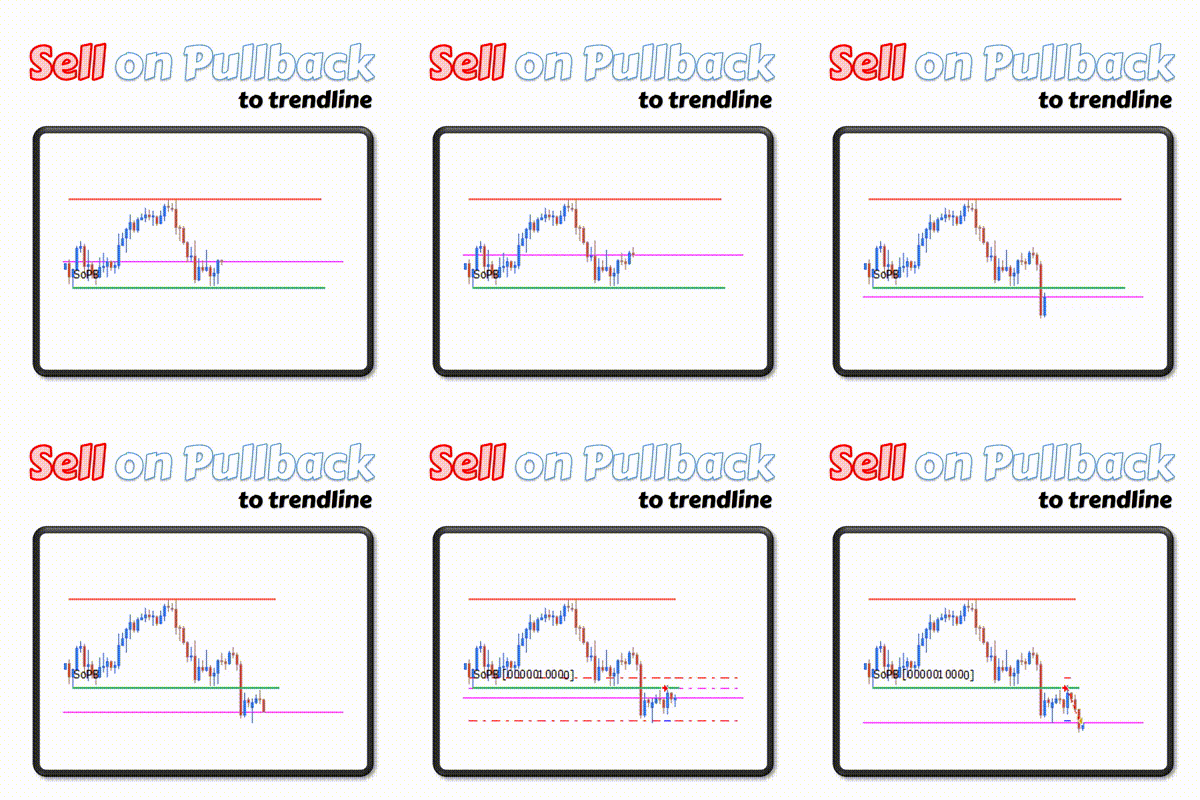
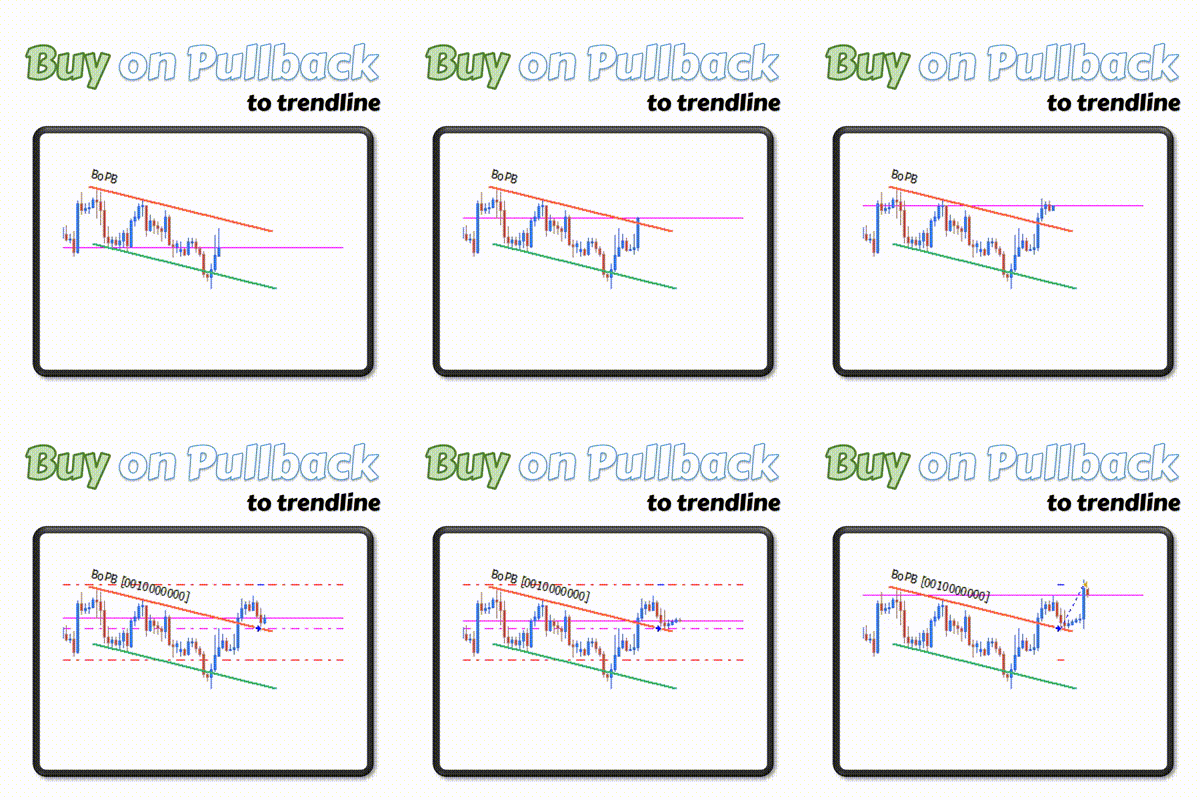
Execute when price breaks through the trendline, then returns to it from the other side.
False Breakout
Execute when price briefly breaks through then reverses back, invalidating the breakout.
How it works
Your analysis. Automated execution.
Draw
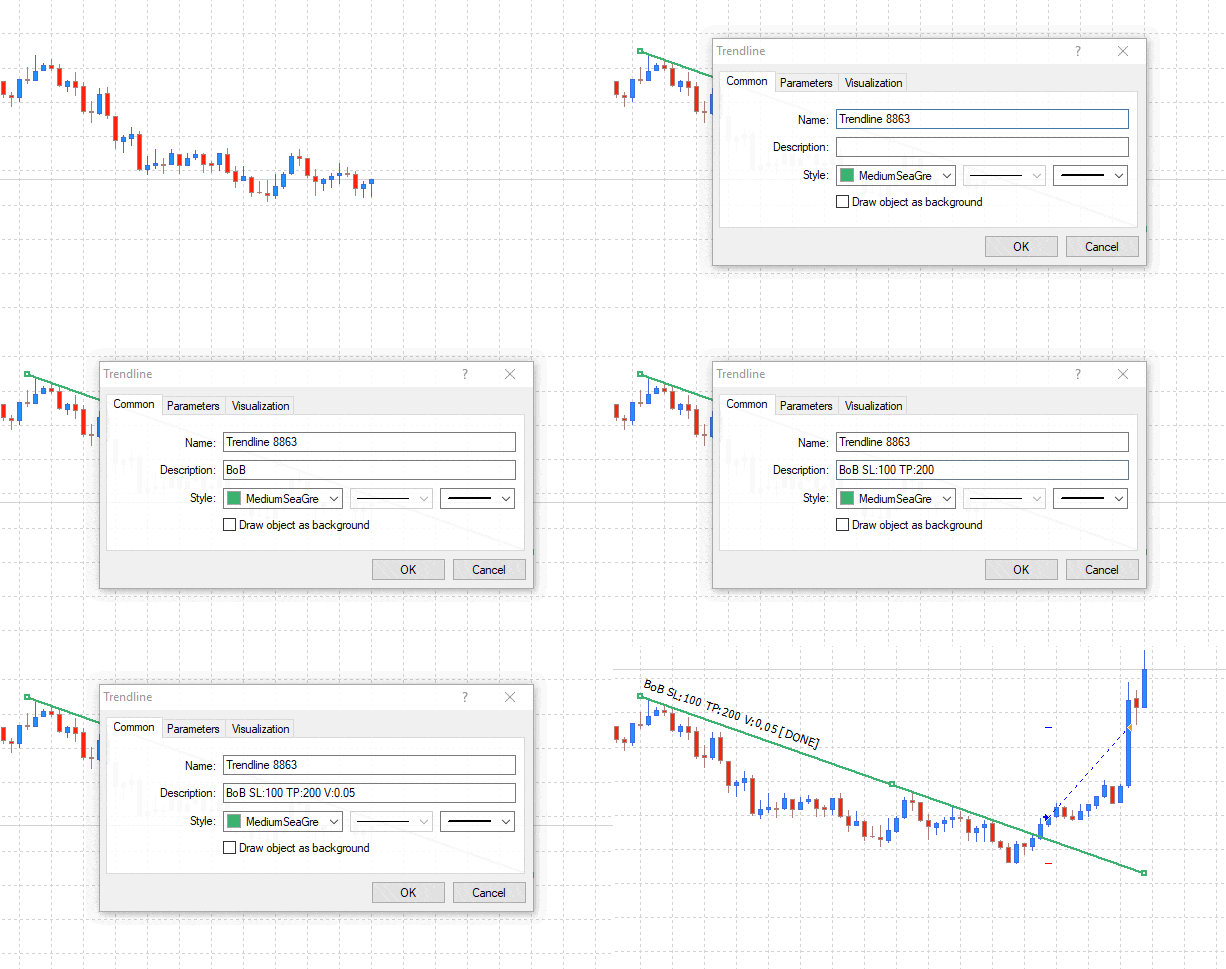
Open your chart and draw a trendline using MetaTrader's standard drawing tools. The EA never moves or modifies your lines.
Command
Add an action command to the trendline name (e.g. SoT SL:100 TP:200 V:0.05). Choose from buy, sell, close, or alert triggers.
Execute
The EA monitors every bar. When price interacts with your trendline, it executes the command automatically.
What the Trendline EA Is Not
This is not a fully automated trading system. The Trendline EA will never open a trade unless you have explicitly configured a trendline with an action command. There is no built-in strategy, no signal generation, and no autonomous decision-making. It is a precision execution tool — you provide the analysis, it handles the order placement.
Purchase Includes
- Expert Advisor file for MT4 and MT5
- Software updates for 12 months
- Technical support for 12 months
- 60-day money-back guarantee
Key Features
4 Trigger Events
Touch, Breakout, Pullback, and False Breakout — four distinct price events with independent actions per line.
Multiple Trendlines
Run multiple trendlines simultaneously on the same chart, each with independent commands, SL, TP, and volume.
Built-in Risk Management
Set stop loss, take profit, and lot size directly in the trendline command string.
Trailing Stop & Breakeven
Built-in trailing stop and breakeven stop to protect open profits automatically.
Re-entry Configuration
Allow the EA to open a new trade after the previous one closes. Set a maximum number of re-entries per line.
Multi-Channel Alerts
Popup, email, push notification, and sound file alerts when any trendline event fires.
All Symbols & Timeframes
Works on any symbol and timeframe supported by MetaTrader 4 or MetaTrader 5.
MT4 & MT5 Support
Delivered as both .ex4 and .ex5 files — works on both MetaTrader platforms.



Trader Reviews
- ✓ Verified
Yuki Tanaka
Good tool overall. Wish there was more documentation on parameter tuning but the defaults work fine.
- ✓ Verified
Carlos Mendez
- ✓ Verified
Anna Johansson
Support team is excellent. Had a small compatibility issue and it was resolved within hours.
- ✓ Verified
Thomas Berger
Exactly what I needed for my trendline breakout strategy. No more manual execution errors.
Priya Nair
Moved up from a free indicator. Setting the entry, stop, and target on the line itself is the difference.
- ✓ Verified
Luca Benedetti
Works the way I set it up on GBPUSD. Would still like a per-line time filter in a future update.
- ✓ Verified
V R Eswara Ramanan
Excellent product with amazing support. I am extremely satisfied. The developer is always helpful and created a new version with a new feature I requested. Lots of thanks to Carlos. Already I recommended to 3 of my friends. They are also very happy. :)
- ✓ Verified
nwh1984
For the price of the EA/Indi vs the functions it can perform at this price point, I'm extremely satisfied. Thanks
- ✓ Verified
paddock
If your a trendline trader this is the best EA you can get. There is nothing it doesn't cover. And affordable too. So just buy it and try it. I tend to use it with fib, fib extensions and s/r with good results. Don't forget it's up to you to select which trade you are going to take. There is no holy grail only assistance and this is the one for me. Thanks to Carlos the Author who is very helpful too.
- ✓ Verified
Thomas Pierre Maurice Moine
Very usefull, you can build up an entire semi-auto strategy with this EA. With Trailing stop and breakeven, that will be perfect. I mainly use it with BoFB strategy on indices supports and a shift value high enough not to trigger "false false breakout", it performs very well 👍
- ✓ Verified
Eduardo Silva Vian
Simplesmente espetacular, com a atualização de breakeven e trailing stop ficou perfeito. Para traders de price action ferramenta indispensável. Outro recurso muito interessante são os alertas.
- ✓ Verified
Ramon
Very good and smart EA. Good points: - Can intereact with other EA's specifining Magic Number - Different commands to execute orders: at touch, at breakout, at pull back, at false breakout - Smart way to specify sl ant tp and volume for each order by object descrition instead of EA's parametres Points to improve at my opinion: - Risk Management - Filters : spread, working hours, volatility - Exit conditions: trail stop - Auto draw trendlines, supports and resistences Thanks Carlos Great job!
- ✓ Verified
paddock
Fantastic, in fact it's good I have for both MT4 and MT5.
Write a Review
Sign in to receive a Verified Purchase badge if you own this product.
Frequently Asked Questions
- First, a candle must close on the opposite side of the trendline. If a later candle returns and touches the line from the original side, the EA executes the order. This confirms the line held as support or resistance after the initial break.
- These trigger when price breaks through the trendline and then reverses back, forming a false breakout. A minimum distance filter prevents weak breakouts from triggering — if set to 100 points but price only moves 50 points before returning, no trade opens.
- Candle-close mode: the order opens only after a candle closes beyond the trendline. Pip-distance mode: the order opens as soon as price exceeds the trendline by the defined number of pips. Candle-close avoids false triggers from wicks; pip-distance is faster.
- No. The EA never draws, moves, or modifies your trendlines. Your chart analysis remains entirely your own — the EA only reads the trendline name to extract the command.
- Yes. Each trendline carries its own independent command, so you can have multiple active setups on the same chart simultaneously — each with different actions, lot sizes, and risk parameters.
- Yes. Your purchase includes both the .ex4 file for MetaTrader 4 and the .ex5 file for MetaTrader 5. Both versions are delivered with updates and support for 12 months from purchase.
Setup Guide
Install on MetaTrader 5
Download the FXTT_TrendlineEA.ex5 file after purchase. Open MT5 and go to File → Open Data Folder. Navigate to MQL5 → Experts. Copy the .ex5 file into the Experts folder. Return to MT5, right-click the Navigator panel and select Refresh. Drag the EA from Navigator → Expert Advisors onto any chart.Install on MetaTrader 4
Download the FXTT_TrendlineEA.ex4 file after purchase. Open MT4 and go to File → Open Data Folder. Navigate to MQL4 → Experts. Copy the .ex4 file into the Experts folder. Close and reopen MT4. Drag the EA from the Navigator window onto any chart.Add a trendline command
Draw a trendline using standard MetaTrader drawing tools. Open the trendline properties (double-click to select, then F8 or right-click → Properties). In the Description field, add your command — for example: BoT SL:100 TP:200 V:0.05. The EA reads the trendline name/description and executes the specified action when the trigger event occurs.Configure EA inputs
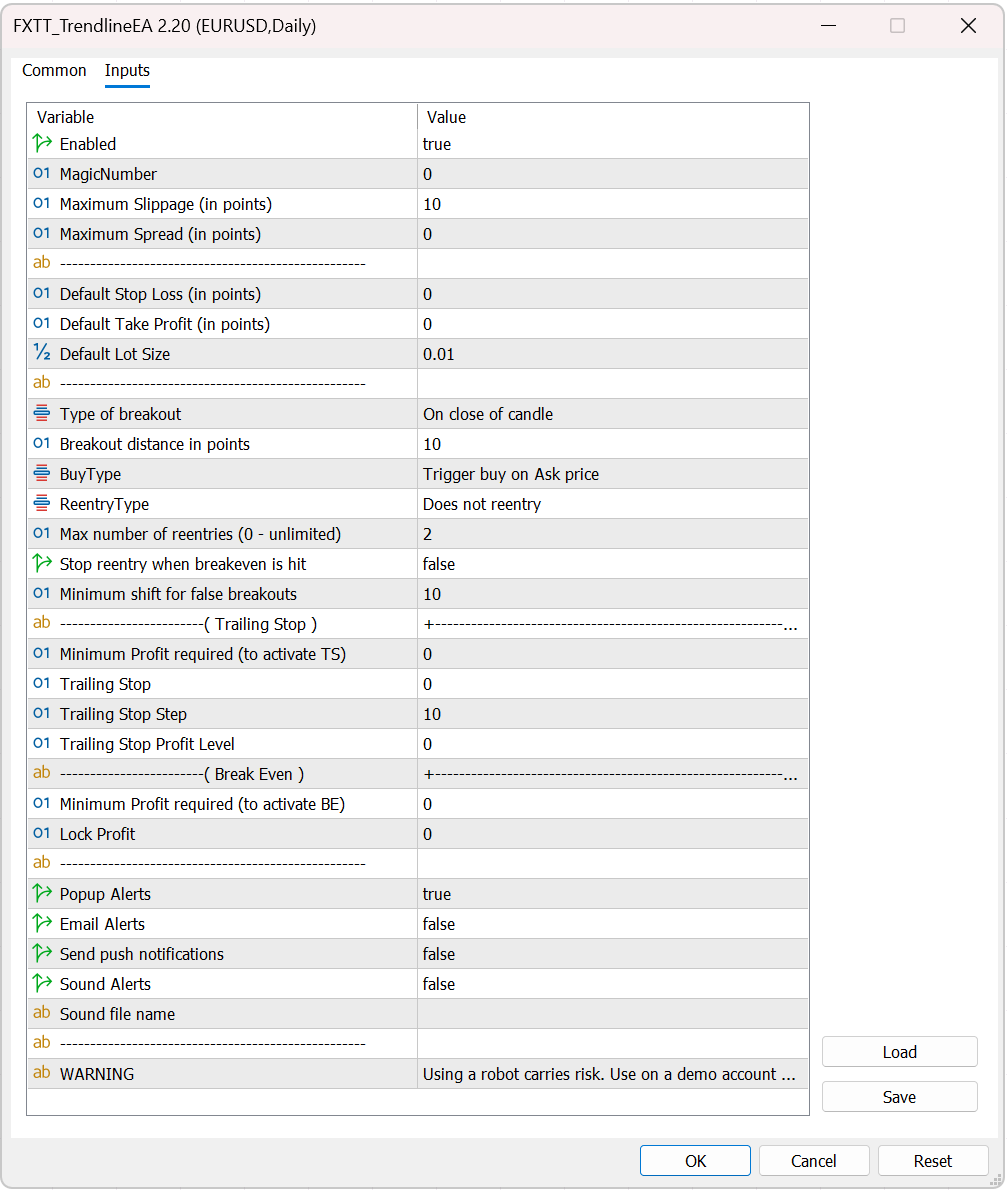
In the EA inputs: set Magic Number for trade identification, Default Stop Loss and Take Profit (used when not specified in the command), Default trade volume, Breakout detection method (candle close or pip distance), and alert delivery options (popup, email, push notification, sound file). Enable the EA after reviewing all settings.
Changelog
- Added trading session filter (UseSessionFilter/SessionStartHour/SessionEndHour);
- Added line color feedback on trigger (ShowTriggerFeedback/TriggerFeedbackColor);
- Added per-line max:N modifier to override MaxCommandExecutions;
- *Version 2.20 2026.17.03**
- Close commands (CP, CaS, CaB, CaO) now work reliably on all account types (including futures netting accounts).
- Additional improvements include a "Stop Reentry on Breakeven" option
- Fixes for the CaO atclose command and other close command edge cases.
- *Version 2.11 2025.12.22**
- Added "Max number of reentries" feature
- *Version 2.10 2025.12.07**
- Fixed issue in CaO for multiple orders in crypto symbols
- *Version 2.9 2025.12.07**
- Stability improvements
- Fixe issue with move to Breakeven stop loss
- Fixed issue where CaO would not close all orders
- *Version 2.5 2021.11.15**
- Fixed small issue in TrailingStop
- *Version 2.4 2021.11.15**
- Added support for Trailing Stop
- Added support for Breakeven Stop
- *Version 2.3 2019.03.25**
- Improved stability of EA
- *Version 2.2 2019.03.20**
- Hotfix for some brokers where order open was failing
- *Version 2.1 2019.03.19**
- Fixed bug with commands BoPB & SoPB
- Fixed issue were multiple orders were opened upon broker error
- Other stability improvements
- *Version 1.122 2018.07.17**
- Improved trendline detection when price moves very rapidly
- Removed automatic setting of trendlines description on chart
- *Version 1.100 2018.06.18**
- Fixed bug where Reentry after previous order closes would not work
- Fixed bug where the commands CaO CaB CaS would not work properly
- Several improvements
- *Version 1.95 2018.04.06**
- Fixed bug where CaO command would close orders on all charts
- *Version 1.90 2018.03.01**
- Fixed bug with Breakout commands
- Several stability improvements
Automate your trendline trades — draw, command, execute.
Get Started Trendline EATrading tools are analysis and execution aids. They do not guarantee profits. Always test with appropriate risk controls before live trading.