
Strategy Checklist
Free Trading Checklist Tool
This is an indicator that I implemented to help me in my manual trading. It allows you to define a checklist that helps you check your rules before opening a trade. Keep in mind that this is not automatic. You must manually define the checks and mark them as according to your strategy.
Free Download
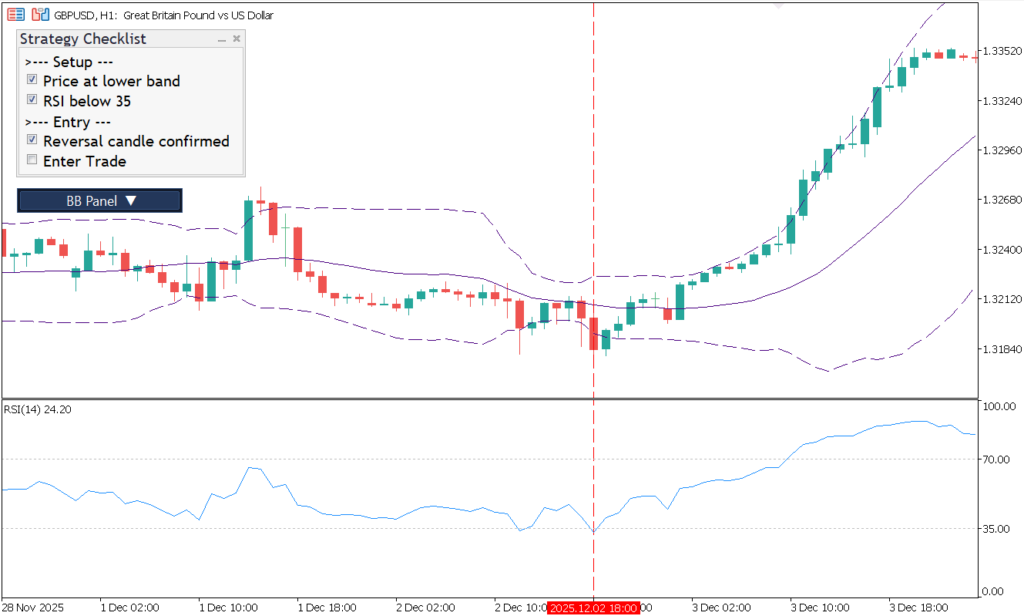
Strategy Checklist is a free MetaTrader 4 indicator that places an interactive checklist panel directly on your chart. Before opening a trade, you tick off each rule in your setup — keeping your execution process visible, repeatable, and independent of memory or emotion.
You define up to 20 checklist items in the indicator inputs. A leading ">" character turns any line into a section header, so you can organize your workflow into logical blocks such as setup conditions, entry triggers, and risk management checks.
Checklist state is saved per symbol and optionally per timeframe, so your progress persists between sessions. If you trade multiple pairs with different rule sets, each chart keeps its own independent state.
The indicator is a discipline and workflow tool only — it does not place orders, move stops, or interact with the broker in any way. Everything is manual and intentional.
Key Features
- On-Chart Checklist PanelAn interactive dialog sits directly on your MT4 chart so your rules are always visible while you analyze price action.
- Up to 20 Custom RulesDefine up to 20 checklist lines in the indicator inputs — tailored to your exact trading strategy.
- Section HeadersUse a leading ">" character to create labeled section blocks such as Setup, Entry, and Risk Management.
- Persistent StateChecklist state is saved per symbol and optionally per timeframe, surviving chart closes and MT4 restarts.
- Configurable LayoutControl dialog width, chart corner, row height, inner padding, and distance from the chart edge to fit any screen.
- Full Appearance ControlCustomize font name, font size, checked color, unchecked color, section color, and title color to match your chart theme.
- Multi-Instance SupportRun multiple instances on the same chart by assigning each a unique TAG value — useful for layered or timeframe-based checklists.
- No Automation, No RiskThe indicator is purely a discipline tool. It never places or modifies orders, keeping full control in your hands.
Trader Reviews
Laura Bianchi
Helped me stop overtrading. I can't take a trade now unless every box is ticked.
Arjun Sharma
Simple idea, huge impact on my discipline. Customised the checklist in minutes.
Chloe Beaumont
Really useful for keeping to my trading plan. Saves it between sessions too.
Marcel Weber
Write a Review
Frequently Asked Questions
- It places a checklist panel directly on your chart so you can confirm your trading rules before entering a trade.
- Yes. You can define up to 20 checklist lines in the inputs and group them with section headers.
- Yes. The indicator can save state per symbol and optionally per timeframe, which is useful if you use different workflows on different charts.
- No. It is a discipline and workflow tool only.
- It is especially useful for discretionary traders, prop-firm traders, and anyone trying to reduce impulsive entries by following a written process.
Setup Guide
Download the ZIP
Download the ZIP package from this product page.Extract the Archive
Extract the archive and locate the indicator file inside.Open the MT4 Data Folder
In MetaTrader 4, open File → Open Data Folder.Copy to Indicators Folder
Navigate to MQL4/Indicators and copy the extracted file there.Restart MT4
Restart MetaTrader 4 or right-click the Navigator panel and select Refresh.Attach and Configure
Drag Strategy Checklist onto any chart and define your checklist rules in the indicator inputs before your trading session begins.
Changelog
- Initial public release of Strategy Checklist.
- Added on-chart checklist dialog with customizable sections and rule items.
- Added persistent checklist state to support repeatable trading workflows.
More Free Tools
Free Download
Free tools are analysis aids and utilities. They do not guarantee trading results. Always test in a demo account before applying to live markets.