
 Technical Analysis
10 Best Free MT5 Indicators (2026)
10 free MT5 indicators for trend, structure, momentum, correlation, sessions, and pivots, all free with no trial and no expiry.
The best MT4 indicators for spotting trends, timing entries, and managing risk — a top-10 toolkit every MetaTrader 4 trader should know.
If you’ve ever installed MetaTrader 4 and immediately searched for the best MT4 indicators, you’re not alone. The right indicators help you spot trends, define key levels, understand session behavior, and avoid trading blind. The wrong ones clutter your chart and give you false confidence.
In this guide, you’ll get a clean, practical shortlist of 10 MT4 indicators I actually consider useful, plus: a quick comparison table, clear download buttons, and a simple step-by-step installation walkthrough. Already switched platforms? See the companion 10 Best Free MT5 Indicators guide instead.
About the author: Carlos Oliveira. I build trading tools for MetaTrader and run ForexTradingTools.eu. I focus on practical utilities and indicators that improve decision-making, chart clarity, and risk awareness.
This guide shortlists 10 MT4 indicators for spotting trends, timing entries, and managing risk, then shows how to install and combine them without cluttering your chart.
The table below summarizes what each of the 10 MT4 indicators does, its ideal use case, and the timeframe it works best on, so you can pick 2-3 before reading the full breakdowns.
| Indicator | Best For | Best Timeframe |
|---|---|---|
| Key PA Levels | Support/resistance, targets, stop placement, big-figure levels | Any (H1-D1 preferred) |
| Session High Low | Intraday structure, breakouts, session range plays | M5-H1 |
| Support & Resistance Price Zones | Identifying key zones, planning entries/exits, placing risk | M15-H4 |
| Equity and Balance | Monitoring performance, spotting drawdowns, sanity-checking robots | Account-level (any) |
| MTF Bollinger Bands | Confluence, volatility context, higher-timeframe confirmation | M5-H1 (HTF bands: H1-D1) |
| Daily Profit Loss | Daily discipline, tracking progress, preventing revenge trading | Account-level (any) |
| Daily Data | Intraday context, daily range awareness, avoiding late entries | M5-M30 |
| CalendarFX | Avoiding trades before high-impact news, planning session risk | M1-H1 |
| Strategy Checklist | Preventing impulse trades, staying consistent, building habits | Any |
| Zig Zag Value | Swing structure, Fibonacci tools, simplifying market noise | M15-H4 |
Tip: Don’t use all 10 at once. Start with 2-3 that match your trading style, then add only if it improves clarity.
The list below covers 10 MT4 indicators for price levels, session timing, multi-timeframe confluence, and trading discipline, each with what it does, when to use it, and a direct download link.
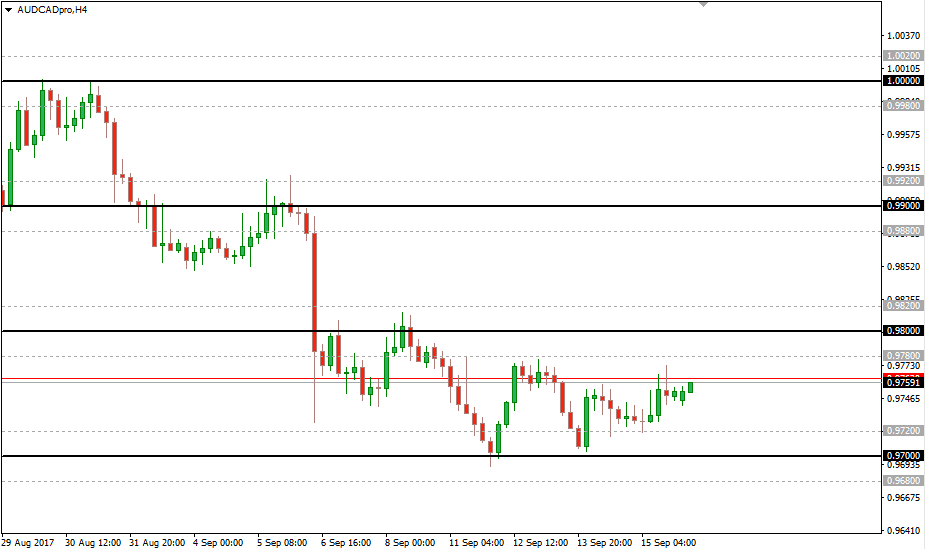
What it does: Draws clean horizontal levels based on psychological price action zones (especially round numbers), helping you see natural support and resistance quickly.
It's best for support/resistance, targets, stop placement, and “big figure” levels (e.g., 1.1000), and it works on any timeframe, though I like it for H1-D1 analysis. It helps because humans cluster orders around clean numbers, so these levels often matter.
Expert tip: Use these levels to define trade “zones,” then wait for your entry trigger (candle pattern, breakout, retest, etc.). Levels alone are not an entry.
⬇️ Download Key PA Levels (MQ4)
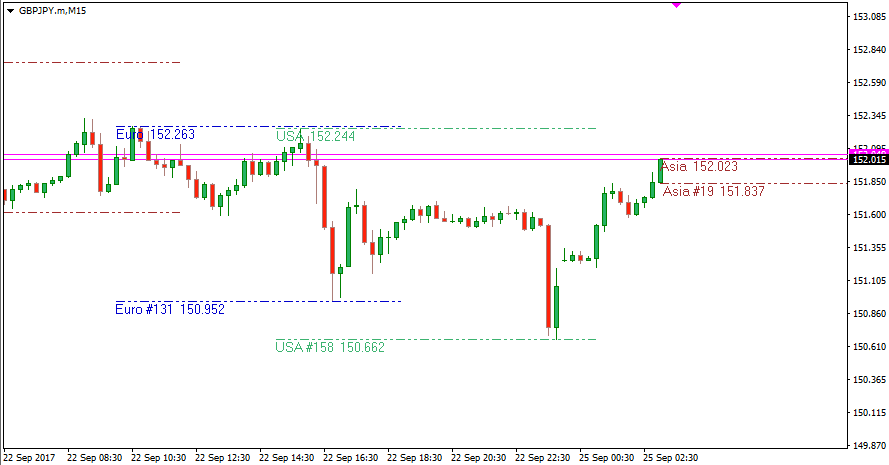
What it does: Shows when major trading sessions start/end and plots each session’s high/low levels, plus overlap windows. Extremely useful for intraday traders.
It's best for intraday structure, breakouts, and session range plays on M5-H1 charts. It's great for spotting when volatility is likely to pick up around session opens and overlaps.
Expert tip: If you trade London or NY, treat session high/low like “intraday key levels.” Combine with a PA trigger instead of guessing.
⬇️ Download Session High Low (EX4)
External source: CJA Trading Tools
Want the actively maintained MT5 version? Get Session High Low MT5 →
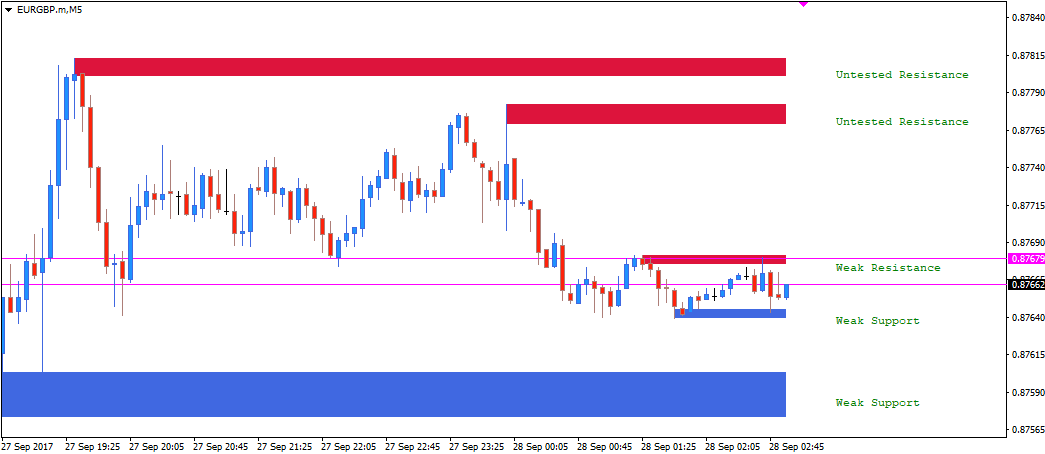
What it does: Automatically finds support and resistance zones using fractals, then labels zones by strength/validation (e.g., tested vs untested). Great if you’re still building confidence drawing levels manually.
It's best for identifying key zones, planning entries and exits, and placing risk on M15-H4 charts. It helps because it turns messy “guesswork” into consistent zones you can review quickly.
Expert tip: Treat zones as areas, not single lines. Combine with a session level (#3.2) or a round number level (#3.1) for higher-quality confluence.
⬇️ Download Support & Resistance Price Zones
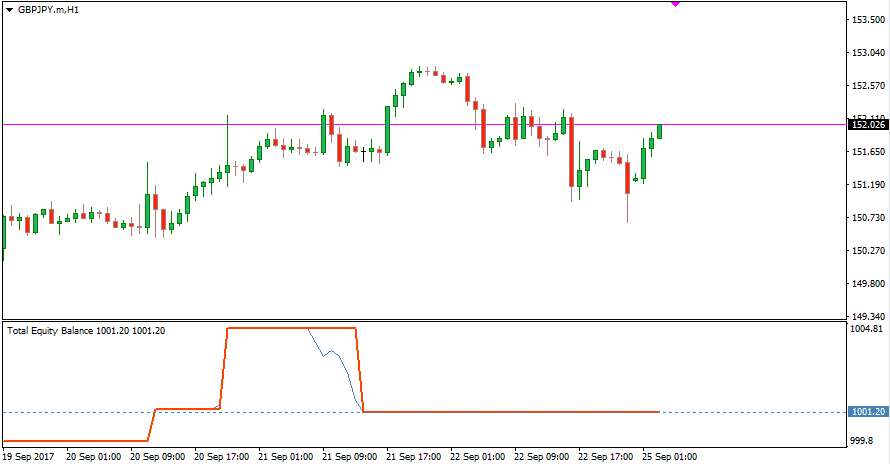
What it does: Displays equity/balance performance in a clearer way and helps you quickly see how trading (manual or automated) is behaving over time, which is especially useful during live tests.
It's best for monitoring performance, spotting drawdowns earlier, and sanity-checking robots. It isn't tied to any chart timeframe, since it's an account-level view, and it helps because balance can look “fine” while equity is quietly bleeding.
Expert tip: If you run EAs, set a maximum acceptable equity drawdown and respect it. Most blow-ups happen because traders ignore equity until it’s too late.
⬇️ Download Equity Indicator (MQL5 Codebase)
Want the actively maintained MT5 version? Get Equity Tracker MT5 →
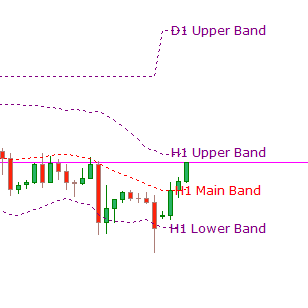
What it does: Displays Bollinger Bands from higher timeframes on the same chart. This helps you trade lower timeframes while staying aligned with higher-timeframe volatility and mean-reversion context.
It's best for confluence, volatility context, and higher-timeframe confirmation. Trade M5-H1 with H1-D1 bands layered on top, since lower-timeframe signals are stronger when they agree with higher-timeframe structure.
Expert tip: If price is stretched at the HTF outer band, be cautious with trend-chasing entries on lower timeframes.
⬇️ Download MTF Bollinger Bands
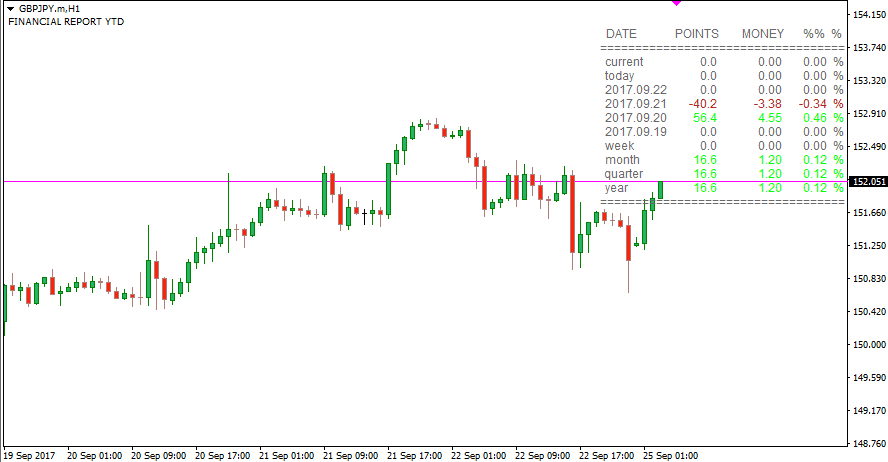
What it does: Shows performance as a compact table (points, money, % change) across different time windows. It’s a clean “dashboard” view of results without opening separate reports.
It's best for daily discipline, tracking progress, and preventing “revenge trading.” It's account-level rather than tied to a chart timeframe, and it helps by keeping you aware of performance in real time.
Expert tip: Set a daily max loss rule. When it hits, stop. A “small red day” protects you from a catastrophic day.
⬇️ Download Daily Profit Loss (MQ4)
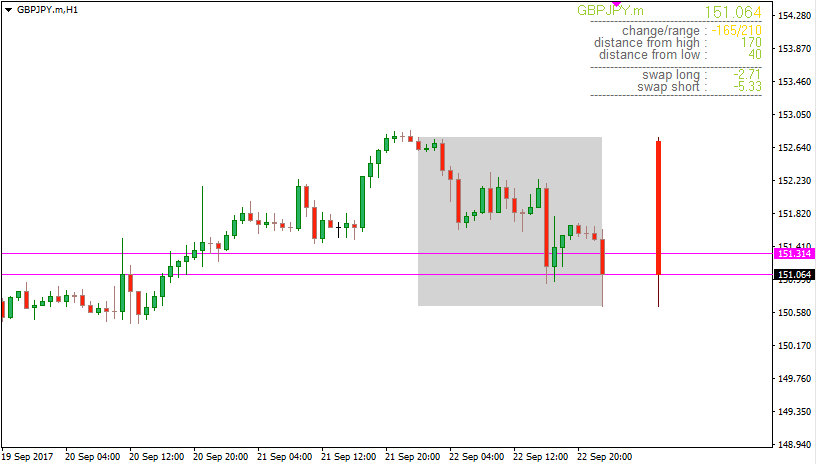
What it does: Adds daily context to intraday charts: a box over the current day’s candles, a daily candle on the side, and useful stats like range and distance to the day’s high/low.
It's best for intraday context, daily range awareness, and avoiding late entries on M5-M30 charts. It helps because many bad trades happen after most of the day’s range is already “spent.”
Expert tip: Combine this with Session High/Low. If price is already near the day’s extreme, be selective with breakout trades.
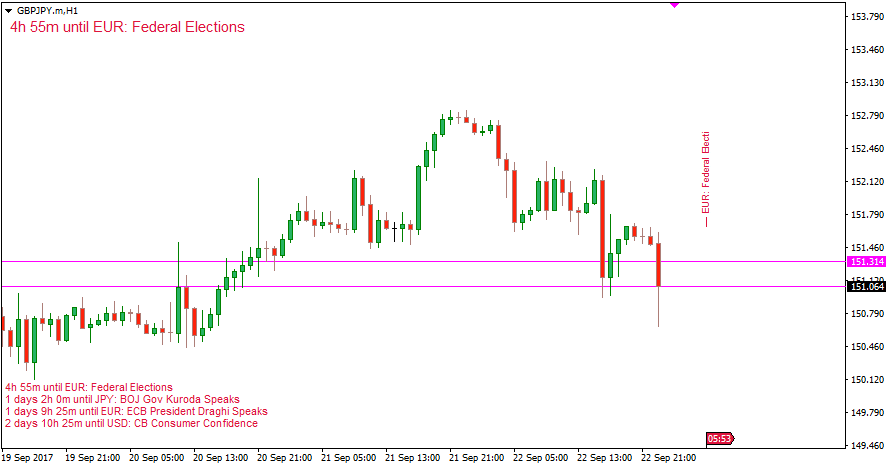
What it does: A clean news calendar indicator that can show upcoming events in a simple table and optionally mark them on your chart (flags/lines). Ideal if you want a quick “news filter.”
It's best for avoiding trades right before high-impact news and planning session risk on M1-H1 charts. It helps because spreads widen and volatility spikes can invalidate technical setups.
Expert tip: If you’re new, avoid trading 5-15 minutes before major releases (CPI, NFP, rate decisions) unless news trading is your strategy.
Want the actively maintained MT5 version? Get News Calendar MT5 →
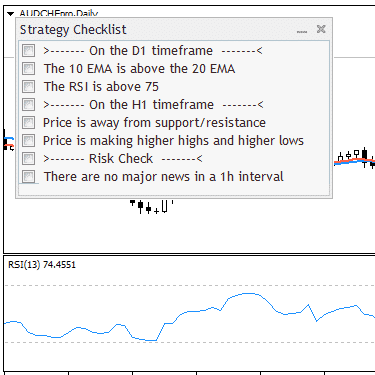
What it does: Keeps a simple checklist visible on your chart so you follow your rules consistently. It’s a discipline tool, not a “signal” tool, and often more valuable than another indicator.
It's best for preventing impulse trades, staying consistent, and building good habits, and it works on any timeframe. It helps because most traders don’t fail from lack of indicators; they fail from breaking rules.
Expert tip: Add “Is risk defined?” and “Is this trade within my plan?” If you can’t answer in 10 seconds, it’s probably a skip.
⬇️ Download Strategy Checklist
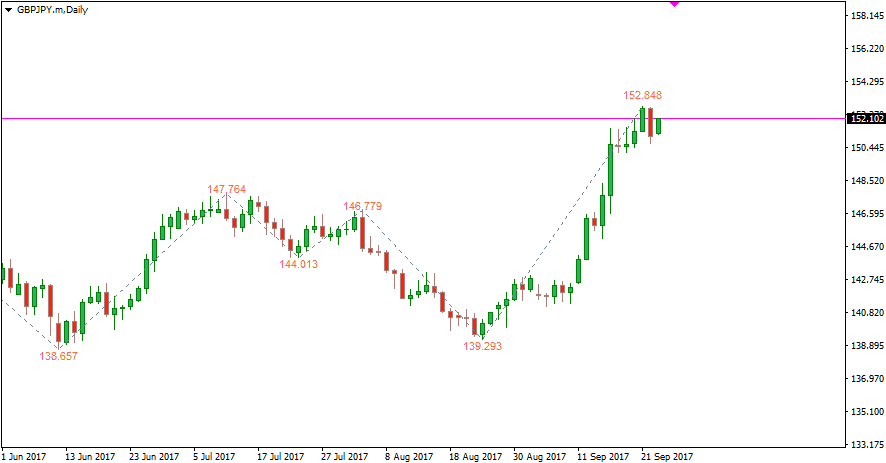
What it does: Filters small price movements to highlight clearer swing highs/lows. Especially useful if you use Fibonacci retracements/projections and want cleaner swing structure.
It's best for swing structure, Fibonacci tools, and simplifying market noise on M15-H4 charts. It helps because cleaner swings mean cleaner fib anchors, with less random guessing.
Expert tip: ZigZag repaints while forming swings. Use it for structure and analysis, not as a standalone entry signal.
⬇️ Download Zig Zag Value (MQ4)
Want the actively maintained MT5 version? Get ZigZag Zones MT5 →
Most “indicator doesn’t work” problems come from installing it in the wrong folder. Here’s the simplest correct method:
Troubleshooting: If the indicator still doesn’t appear, confirm it’s in Data Folder → MQL4 → Indicators (not the Program Files folder), and check the Experts / Journal tabs for errors.
The goal isn’t “more indicators.” The goal is clear confirmation. These combos work because each tool has a different job:
Key PA Levels (3.1) mark the big psychological levels, Session High Low (3.2) adds session range and overlap windows, and Daily Data (3.7) fills in daily range context.
Support & Resistance Price Zones (3.3) supplies automated zones, and MTF Bollinger Bands (3.5) adds higher-timeframe volatility boundaries.
Equity and Balance (3.4) keeps you aware of equity, Daily Profit Loss (3.6) keeps daily behavior in check, and Strategy Checklist (3.9) prevents impulse trades.
Rule of thumb: Use 1 indicator per “job”:
MT4 (MetaTrader 4) is a widely used trading platform for Forex and CFDs that supports custom indicators, scripts, and expert advisors (EAs).
No. Indicators help you visualize information and improve decision-making, but they don’t replace risk management, execution discipline, and a proven trading plan.
No. Start with 2-3 that solve your biggest problems (levels, timing, discipline). Add more only if it improves clarity, never just to “feel confident.”
For most beginners: Key PA Levels (3.1), Support & Resistance Price Zones (3.3), and Strategy Checklist (3.9). They build structure and discipline without turning your chart into noise.
Session High Low (3.2) + Daily Data (3.7) are excellent for intraday context. Add CalendarFX (3.8) if you want a simple news filter.
Some indicators (like ZigZag) update historical points as new price data arrives. That’s not always “bad,” but it means you should avoid using them as standalone entry signals.
If it appears in Navigator → Indicators, it’s installed. If it doesn’t show up, re-check the folder path (Data Folder → MQL4 → Indicators) and restart MT4.
The best MT4 indicators don’t “predict the market.” They help you see what matters faster: key levels, session behavior, daily context, news risk, and your own performance. The real edge comes from combining a few tools with disciplined execution and solid risk management.
Next step (simple 2-week challenge): pick one setup:
CTA: If you found this helpful, leave a comment with your trading style (intraday/swing/EA) and I’ll suggest the cleanest 2-3 indicator combo for your approach.
Technical Analysis10 free MT5 indicators for trend, structure, momentum, correlation, sessions, and pivots, all free with no trial and no expiry.
 Technical Analysis
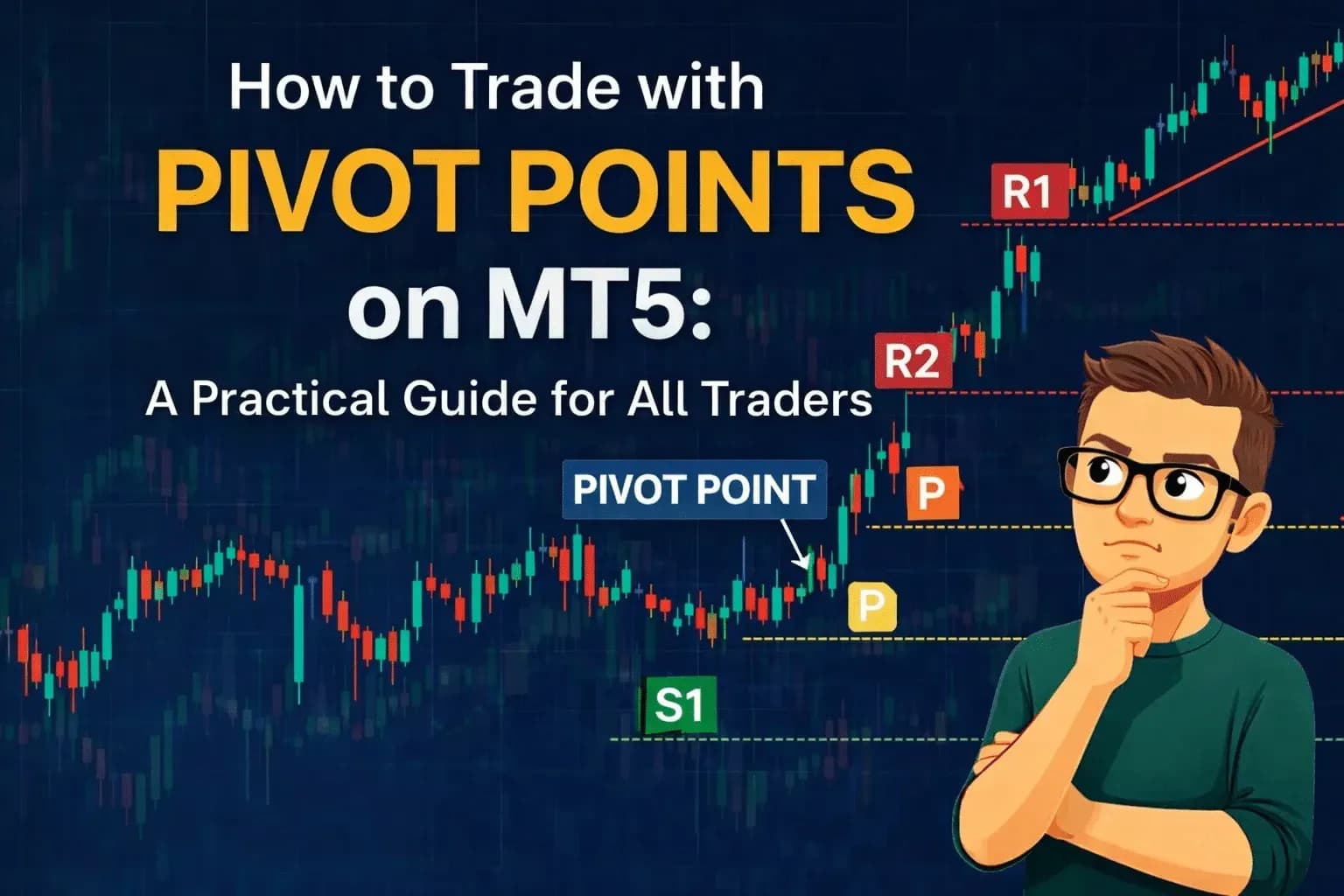
How to trade pivot points on MT5 — bounce trading, breakouts, and confluence strategies, plus a free pivot points indicator to get started.
 Technical Analysis
The best forex indicators for scalping MT5 — Bollinger Bands, EMAs, VWAP, ATR, ZigZag zones and more in a complete five-layer scalping system.