
 Trading Education
How to Backtest Forex in MT5
Simple MT5 forex backtesting guide: modeling modes, 100% modeling quality, real ticks, realistic costs, forward testing, and report checks.
A profitable MT5 Strategy Tester result can still fail live: broker contract specs, permissions, and trade-server responses differ from the backtest.
We’ve watched an EA produce a clean MT5 equity curve, then spend a week on demo consuming CPU. Strategy logic had not changed. Its operating environment had.
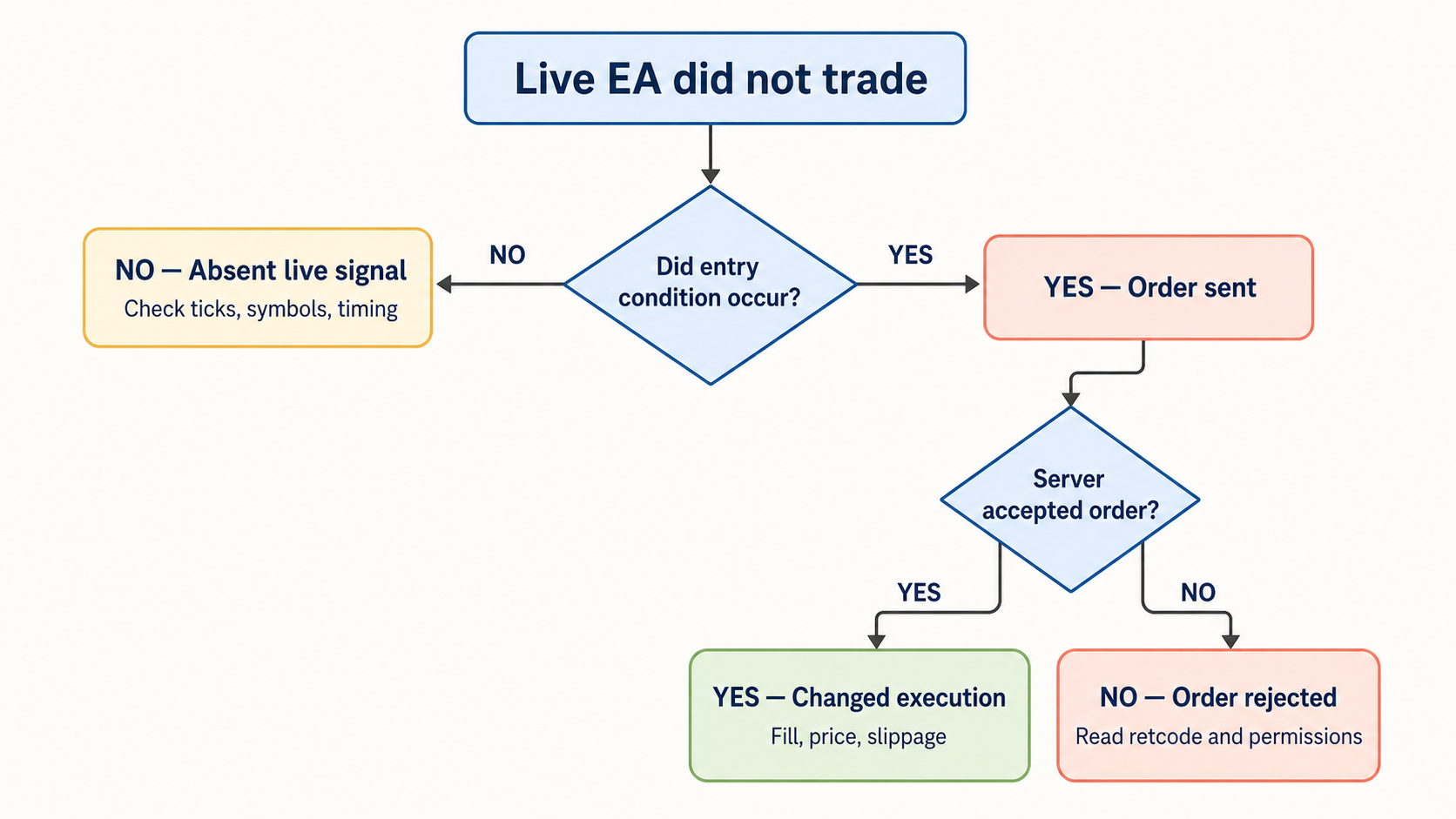
“MT5 strategy tester works but EA fails on live account” is a deployment diagnosis problem, not a strategy verdict. The tester models prices, execution rules, and account conditions in a controlled run. A demo or live terminal runs against a broker’s current symbol catalogue, contract specification, permissions, session state, incoming ticks, and trade server.
A profitable test can fail two ways:
Treat these as separate faults. Re-optimising before separating them turns a deployment issue into a month of fictional research.
The MT5 Strategy Tester documentation covers testing modes, generated ticks, real ticks, spreads, and multi-currency history. That matters. Historical simulation still cannot reproduce a live trade-server response.
The tester gives an EA a repeatable environment. That helps find defects and compare variants. It also removes moving parts that matter after deployment.
| Area | Strategy Tester | Demo or live terminal | What to check |
|---|---|---|---|
| Prices | Historical or generated tick sequence | Incoming broker quotes | Tick arrival, spread behaviour, symbol suffix |
| Contract | Test-time symbol settings | Current broker contract specification | Volume step, stops level, filling mode, trade mode |
| Account | Configured test deposit/leverage | Actual account rules and permissions | Margin mode, hedging/netting, EA permissions |
| Execution | Simulated request handling | Trade server validation and execution | Retcode, deviation, market session, slippage |
| Timing | Fast historical event stream | Real chart-symbol ticks and terminal event queue | OnTick, timer use, bar-close guards |
| Symbols | Tester history loaded for run | Market Watch selection and terminal synchronization | SymbolSelect, history, multi-symbol readiness |
We do not expect identical fills, spreads, or slippage between a backtest and live trading. We do expect an EA to report why it did not trade. Silence is a missing diagnostic.
Run this sequence. Stop when evidence identifies the fault. Each stage narrows the problem without changing strategy inputs.
OnTick, timer, and bar-close assumptions.Start with OnInit(). Print chart symbol, timeframe, account server, magic number, configured symbols, and every input affecting execution. A failed include, invalid input, expired licence check, or early return can make an EA look inert while trade logic never runs.
Confirm Algo Trading is enabled globally and chart-level EA trading permission is enabled. The MQL5 trade-permission reference distinguishes terminal, program, account, and symbol-level checks. One green button does not overrule every other gate. Trading terminals enjoy gates. It gives them something to do on Friday evening.
Print a heartbeat from OnTick() and, if used, OnTimer(). One log line separates “no price event arrived” from “price event arrived but no entry qualified.”
EURUSD in a backtest may become EURUSD.a, EURUSDm, or another broker-specific symbol on the deployment account. Gold reveals this quickly: XAUUSD may have different volume limits, stops distance, contract size, or trading sessions between accounts.
Check these items against the testing environment:
Use SymbolInfoInteger, SymbolInfoDouble, and SymbolInfoString to log symbol properties. The MQL5 Symbol Properties reference lists the full property set.
A “0.10 lots” signal can fail because the live symbol accepts increments of 0.01, 0.1, or 1.0. A stop loss can fail because current SYMBOL_TRADE_STOPS_LEVEL places it too close. These are contract mismatches, not strategy failures.
A test built on unsuitable data can produce entries impossible under the intended price path. MT5 offers generated-tick modes and real-tick mode. Use real ticks for execution-sensitive logic, especially stops, break-even moves, scalping thresholds, or intrabar indicators.
An MT5 real ticks backtest does not reproduce future execution. It forces the EA through recorded bid/ask movement instead of a simplified path. That better tests conditions dependent on tick order.
Audit before optimising:
The tester documentation also notes multi-currency requirements: required symbols must be selected in Market Watch and data loaded. Historical data has gaps often enough to ruin a beautiful theory. It has never felt guilty about it.
OnTick() fires only when the chart symbol receives a new quote. The MQL5 OnTick documentation states that a NewTick event belongs to the EA’s attached chart symbol, not every symbol it reads.
An EA attached to EUR/USD can inspect XAU/USD, but an XAU/USD tick does not directly call that EA’s OnTick(). If the strategy expects gold to trigger an immediate EUR/USD decision, use deliberate scheduling: timer polling, chart attachment strategy, or state carried to the next chart-symbol event.
For each external symbol:
SymbolSelect(symbol, true) during initialization.GetLastError().The Strategy Tester can synchronize a foreign symbol after first access, but live readiness remains a terminal-state question. A string in an input field does not mean price data is ready.
A Boolean from a CTrade method only shows that its local request stage passed. Inspect final server results through ResultRetcode() and ResultRetcodeDescription() after every request. The CTrade reference documents both accessors; the trade-server return-code list names outcomes.
Add a narrow diagnostic wrapper before blaming the entry rule:
#include <Trade/Trade.mqh>

CTrade trade;

void LogTradeEnvironment(const string symbol)
{
   ResetLastError();
   bool selected = SymbolSelect(symbol, true);

   PrintFormat(
      "env symbol=%s selected=%s sync=%s symbol_trade_mode=%d "
      "terminal_trade=%s ea_trade=%s account_ea=%s err=%d",
      symbol,
      selected ? "true" : "false",
      SymbolIsSynchronized(symbol) ? "true" : "false",
      (int)SymbolInfoInteger(symbol, SYMBOL_TRADE_MODE),
      TerminalInfoInteger(TERMINAL_TRADE_ALLOWED) ? "true" : "false",
      MQLInfoInteger(MQL_TRADE_ALLOWED) ? "true" : "false",
      AccountInfoInteger(ACCOUNT_TRADE_EXPERT) ? "true" : "false",
      GetLastError()
   );
}

bool BuyWithDiagnostics(const string symbol, const double volume)
{
   ResetLastError();
   bool accepted = trade.Buy(volume, symbol);

   PrintFormat(
      "buy symbol=%s volume=%.2f accepted=%s retcode=%u reason=%s err=%d",
      symbol,
      volume,
      accepted ? "true" : "false",
      trade.ResultRetcode(),
      trade.ResultRetcodeDescription(),
      GetLastError()
   );

   return accepted;
}
The permission calls use documented terminal, MQL program, account, and symbol state. A nonzero retcode gives the next action:
TRADE_RETCODE_TRADE_DISABLED: inspect terminal, EA, account, or symbol permission.TRADE_RETCODE_MARKET_CLOSED: inspect trading session and test timing.TRADE_RETCODE_INVALID_VOLUME: align volume with symbol minimum and step.TRADE_RETCODE_INVALID_STOPS: respect current stops level.TRADE_RETCODE_NO_MONEY: examine margin, contract size, and account settings.TRADE_RETCODE_REQUOTE, TRADE_RETCODE_PRICE_CHANGED, or TRADE_RETCODE_TIMEOUT: inspect price handling, deviation, and retry policy.Bar-close logic fails live when code treats a forming bar as closed. Tester speed can hide this because the EA processes a known historical sequence without startup gaps or quiet-market waits.
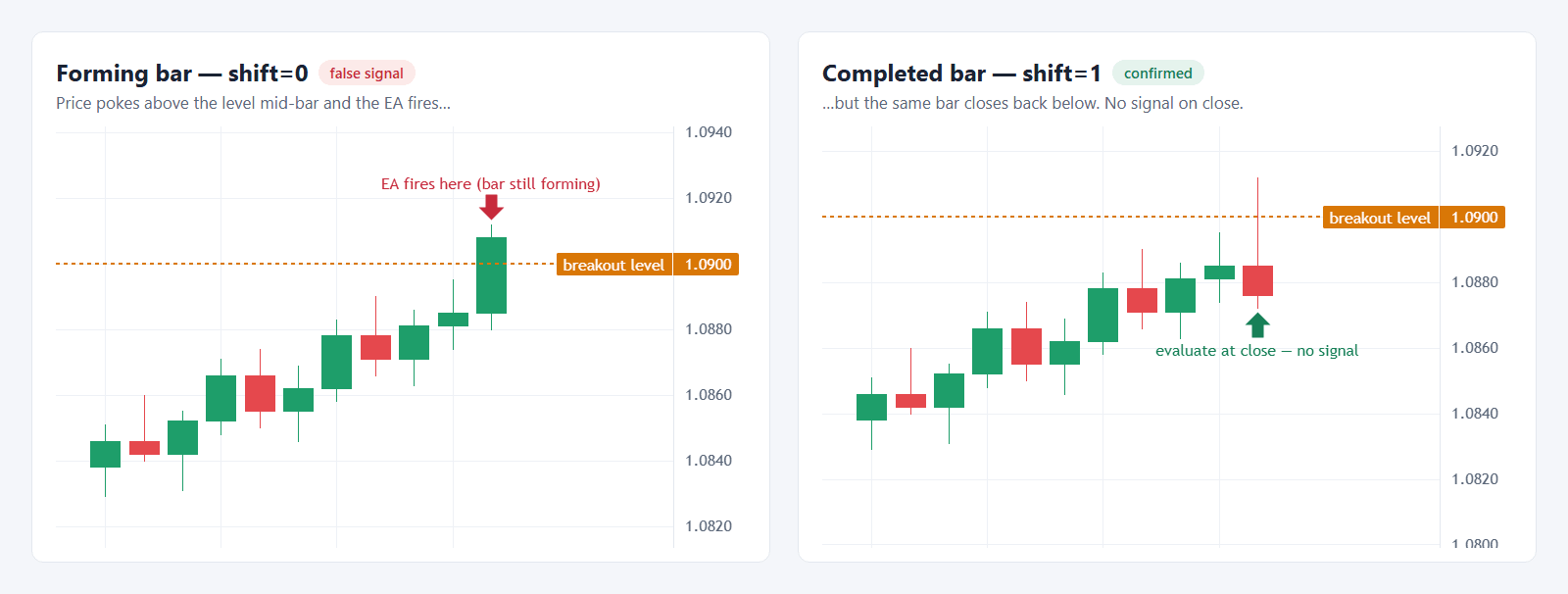
Use a new-bar guard based on the current bar’s opening time. Read indicator values from the completed bar where strategy rules require it. Log bar timestamp, signal value, and decision. A log line with shift=0 versus shift=1 settles arguments faster than a fresh optimisation run.
OnTick() does not queue every tick indefinitely. MQL5 documents that if a NewTick event is queued or being processed, another NewTick event is not added to the application queue. Keep OnTick() short. Move slow scans, file work, and broad symbol polling out of the price-critical path.
Timers need the same discipline. OnTimer runs after EventSetTimer() or EventSetMillisecondTimer() creates a timer. Log timer creation in OnInit(), clear it with EventKillTimer() in OnDeinit(), and do not assume a timer compensates for absent symbol data.
We use three environments because each answers a different question.
The live stage is operational validation, not a performance certificate. Keep volume small enough that a logging error costs embarrassment, not a risk meeting with ourselves.
Monitor from the first deployed order. Our MT5 backtesting workflow covers testing foundations. After deployment, monitor EA performance after deployment to track equity and trade behaviour under live conditions. Equity Tracker for MT5 records what opened, what closed, and what equity did while the Journal accumulated evidence.
A tester result proves the EA survived that test. It does not prove live readiness.
Log symbol identity, contract properties, permissions, current data, entry decisions, and server retcodes before changing strategy logic. The first rejected trade or missing tick usually explains more than another thousand optimisation passes.
Trading EducationSimple MT5 forex backtesting guide: modeling modes, 100% modeling quality, real ticks, realistic costs, forward testing, and report checks.
 Forex Trading Strategies
Build a rule-based forex strategy in MT5 step by step — entries, exits, risk management, backtesting and forward testing, checklist included.