
 Technical Analysis
10 Best Free MT5 Indicators (2026)
10 free MT5 indicators for trend, structure, momentum, correlation, sessions, and pivots, all free with no trial and no expiry.
Trendline PRO is the MT5 EA for discretionary trendline traders — automatic execution on breakouts, pullbacks, touches and false breakouts.

You've drawn the trendline. You've identified the setup. You know exactly what price needs to do for your trade to trigger. Then your phone rings, your attention drifts for thirty seconds. When you look back, price has already broken, run 40 pips, and is now extended far beyond your entry.
This is the core frustration of manual trendline trading. MetaTrader 5 (despite being one of the most capable retail trading platforms available) has no native mechanism to execute orders based on trendline interactions. You can draw lines on a chart, but the platform's execution engine ignores them entirely.
This post walks through Trendline PRO MT5, the Expert Advisor built specifically for discretionary trendline traders. Draw your lines, arm them from the on-chart panel with a single click, and the EA handles every execution. No coding. No scripting. No MQL5 knowledge required.
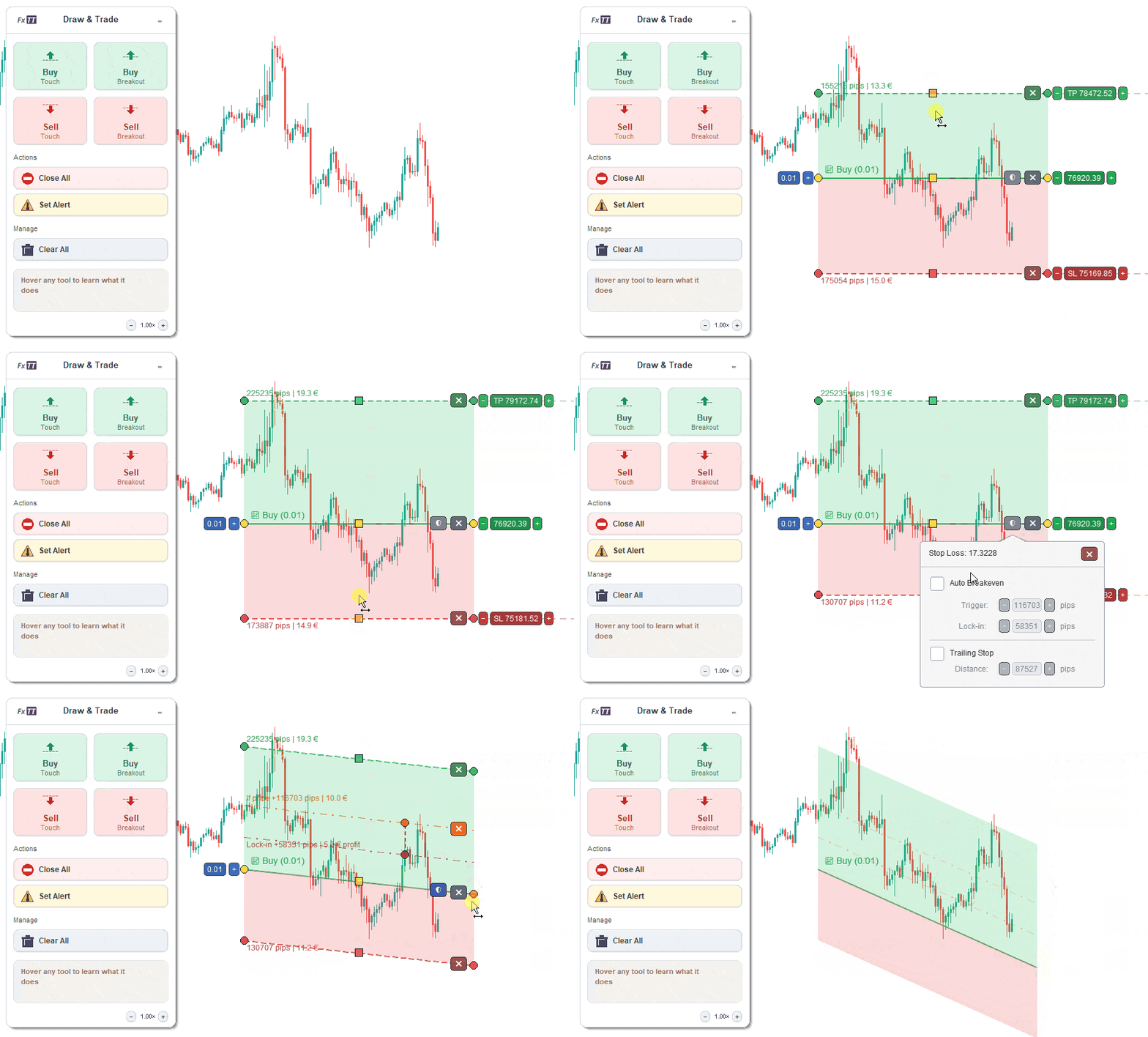
Trendline PRO MT5 EA: draw a trendline, arm it from the on-chart panel, and the EA executes when price reaches it.
Contents
MetaTrader 5 gives you a full suite of drawing tools: trendlines, channels, Fibonacci retracements, horizontal rays. But these are purely visual overlays. The platform's execution engine ignores them entirely.
The only native execution tools are static price-based pending orders: Buy Limit, Sell Limit, Buy Stop, Sell Stop. A trendline is dynamic by definition. Its price value changes with every passing candle as it moves at an angle through the chart. You cannot set a Buy Stop on a trendline in MT5. It is simply not possible.
The workaround most traders use: watch the chart constantly and enter manually when price reaches the line. This creates three problems:
Trendline PRO MT5 eliminates all three.
Trendline PRO MT5 is a semi-automated Expert Advisor. You make the strategic decisions, and the EA handles execution.
You decide:
Trendline PRO MT5 handles:
This is not a black-box system. It does not analyse the market, predict direction, or make any judgement calls. It executes what you configured the instant price reaches your line. Your edge stays yours.
The defining feature of Trendline PRO MT5 is the on-chart control panel. Adding a trendline trade requires no command strings, no Object Properties dialogs, and no syntax to remember.
The workflow is straightforward:
The panel displays your current lot size, spread filter status, and trade controls. All settings are visible at a glance. The panel can be dragged anywhere on the chart, and its position is saved between sessions so it never covers the part of the chart you need.
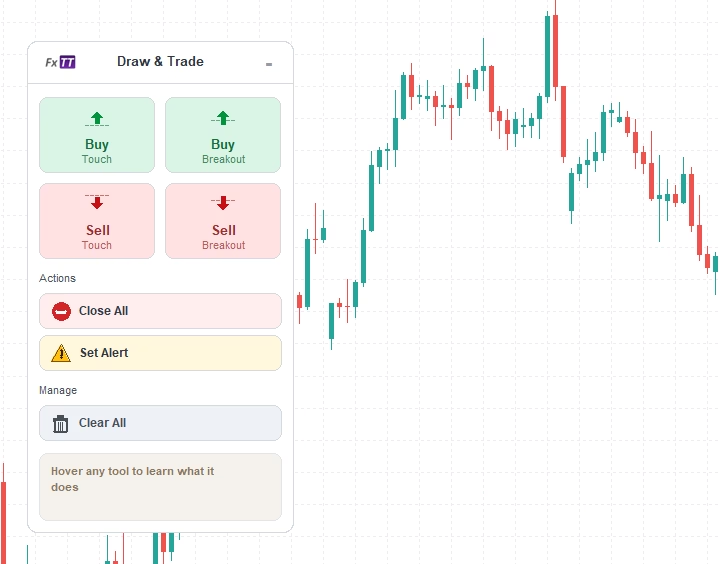
The Trendline PRO MT5 chart panel: add buy, sell, breakout, close, or alert lines in one click directly from the chart.
When you arm a trendline in Trendline PRO MT5, the EA draws your stop loss and take profit levels directly on the chart as shaded zones. Each zone displays the pip distance and the money value of that level (the exact potential loss and potential gain), calculated from your current lot size.
This changes how you plan trades. Instead of estimating risk from a settings panel, you see it on the price chart, anchored to the real price levels that will be active when the trade opens. If the zones don't match your intended risk/reward, you adjust the trendline or the parameters before anything executes.
Risk planning is visual, immediate, and happens before the trade, not after.
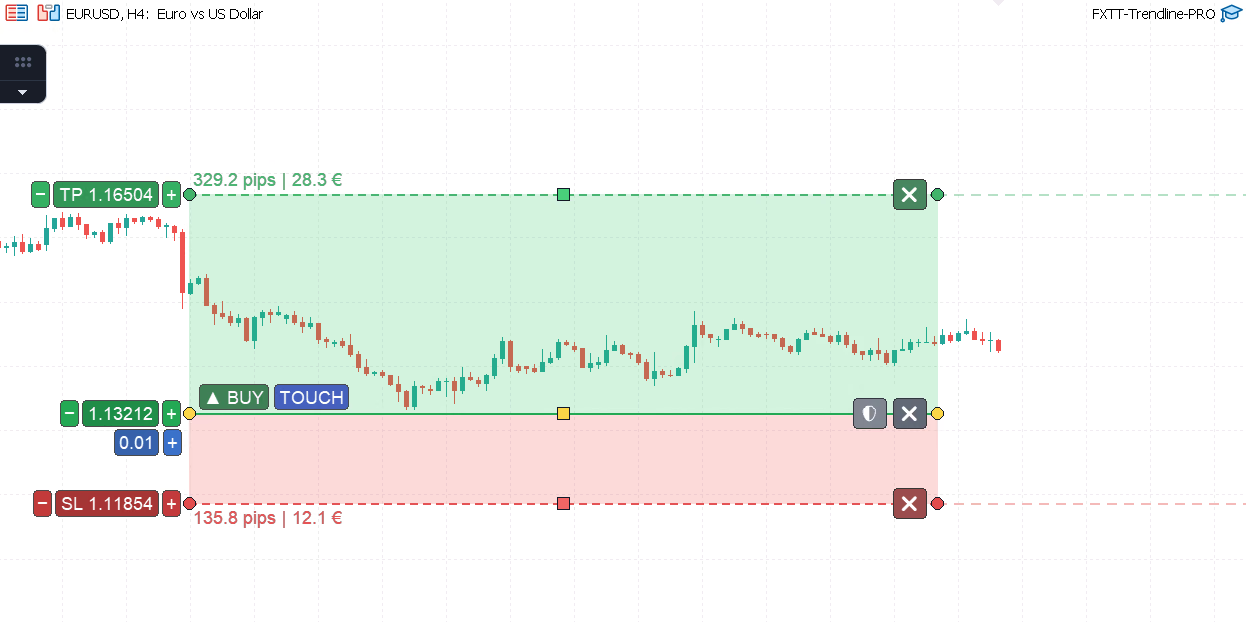
TP and SL zones with pip distance and money value labels: risk planning is visible on the chart before the trade triggers.
Trendline PRO MT5 supports four trigger modes, each matched to a different trading approach. The trigger type is selected from the panel, and no command strings are required.
The trade fires when a candle closes beyond the trendline: above it for a buy, below it for a sell. This avoids false triggers from intra-candle wicks that briefly cross the line without closing through it. Ideal for momentum and channel breakout strategies where candle-close confirmation is required before entry.
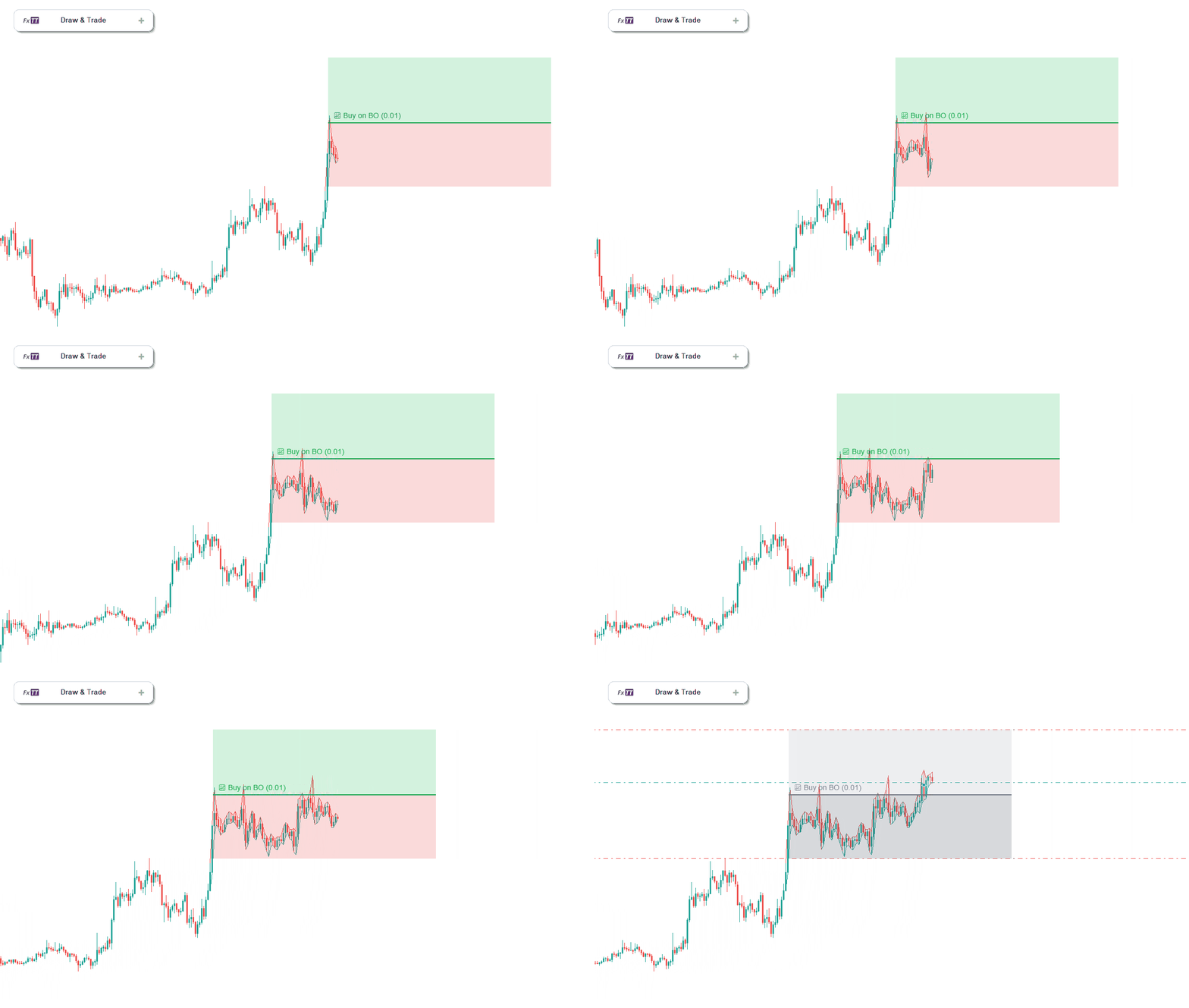
Buy on Breakout: Trendline PRO MT5 enters automatically when a candle closes above the armed trendline.
The EA waits for price to break through the trendline, then monitors for a return move back to the line. When price retests the line from the other side, the trade fires. Better entry prices and tighter stops compared to entering on the initial break, at the cost of occasionally missing the entry if price does not return.
The trade fires the moment price reaches the trendline, on contact, regardless of direction. No candle close confirmation required. Suited for range-bound markets where you expect price to respect the line and reverse. The fastest of the four trigger types.
The EA monitors for price to cross the line and then reverse back through it: the classic stop-hunt or liquidity sweep pattern. When price crosses the trendline and closes back on the original side, the trade fires in the reverse direction. This trigger targets one of the highest-probability reversal patterns in institutional order flow, where large players use trendline breaks to sweep retail stops before reversing hard.
Trendline PRO MT5's breakeven system is fully visual. When you arm a trendline, two reference lines appear on the chart:
Both lines are draggable. Reposition them directly on the chart to adjust exactly when protection activates and where the stop moves to. When the trade is open and price hits the orange trigger line, the EA automatically moves the stop to the dark-red lock-in level, and the trade becomes risk-free without any manual action.
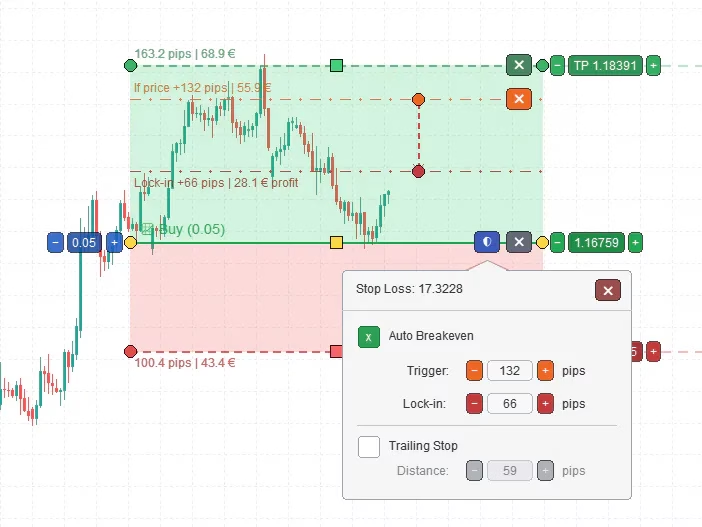
Auto-breakeven protection: orange trigger line and dark-red lock-in line, both draggable and visible on the chart before the trade opens.
Once a trade is open, Trendline PRO MT5 can activate a trailing stop that follows price as the trade moves in your favour. The trailing stop maintains a specified distance behind price. When price reverses, the stop holds at its last position, locking in the captured profit without any manual intervention.
Trailing stop works alongside the breakeven system: eliminate risk first by moving the stop to entry, then let the trailing stop manage the remainder of the trade from a safe base. This is the most common professional configuration for breakout trades: protect capital early, then let the momentum run.
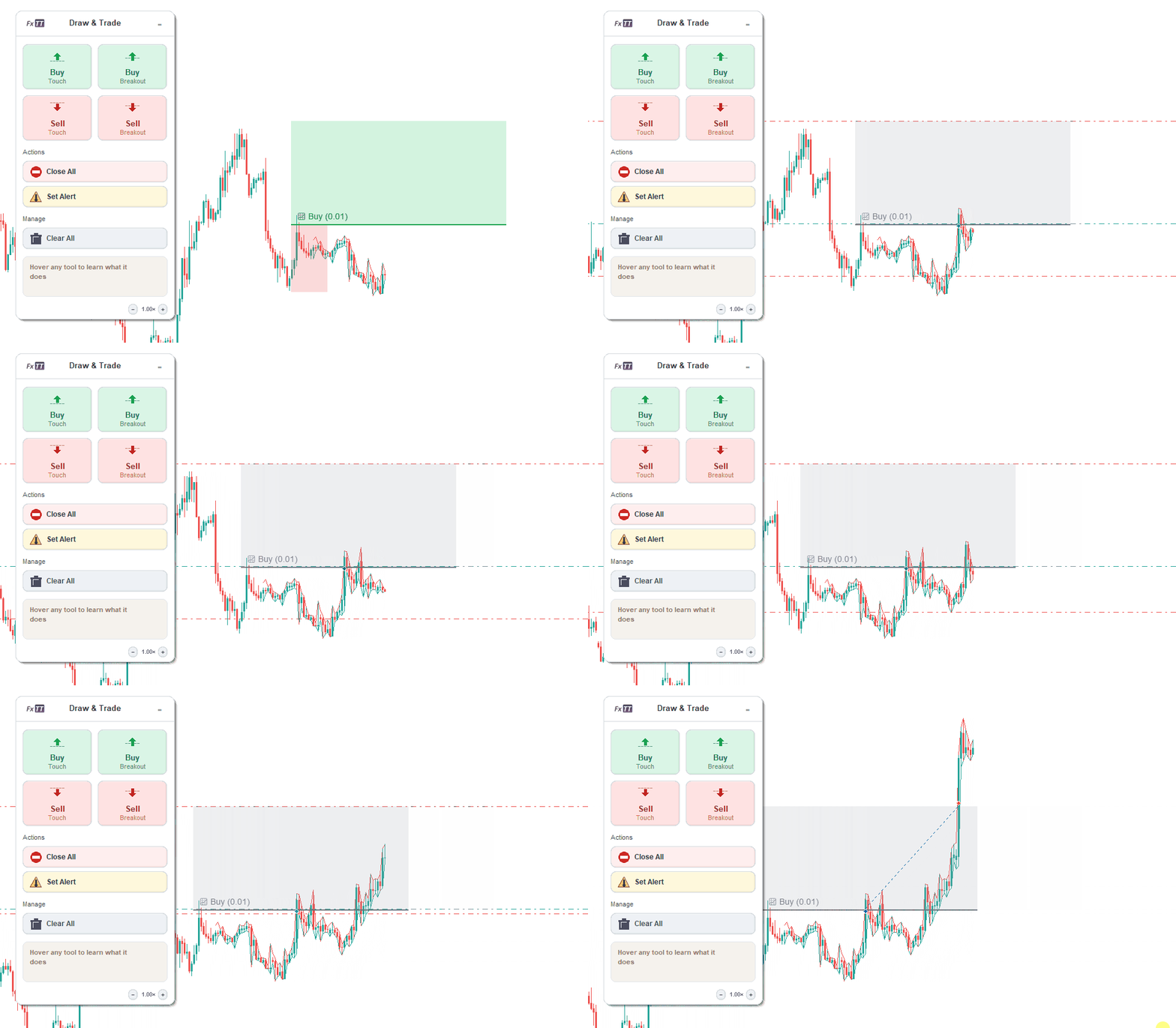
Trendline PRO MT5 trailing stop: the stop follows price as the trade advances, locking in profit automatically at every step.
Every trendline managed by Trendline PRO MT5 has three interactive drag handles: one at the start point, one at the end point, and one at the midpoint. You can reposition any trendline at any time (before or after arming) by dragging the appropriate handle.
This matters in live trading. Trendlines drawn at the start of a session often need refinement as new bars form and the angle becomes clearer. With Trendline PRO MT5, you adjust the line without deleting it and starting over. The configured trigger type and parameters stay intact. Only the price level and angle change.
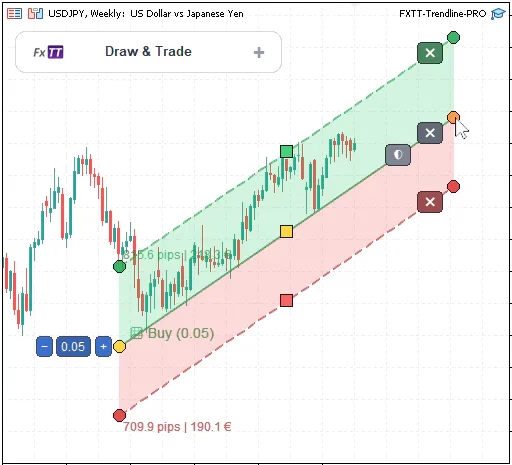
Selected trendline with start anchor, end anchor, and midpoint drag handle: reposition any armed line at any time without resetting its configuration.
All features of Trendline PRO MT5 work together as a single integrated workflow. The animated overview below shows how a complete setup flows, from drawing the trendline to automatic execution and hands-free trade management:
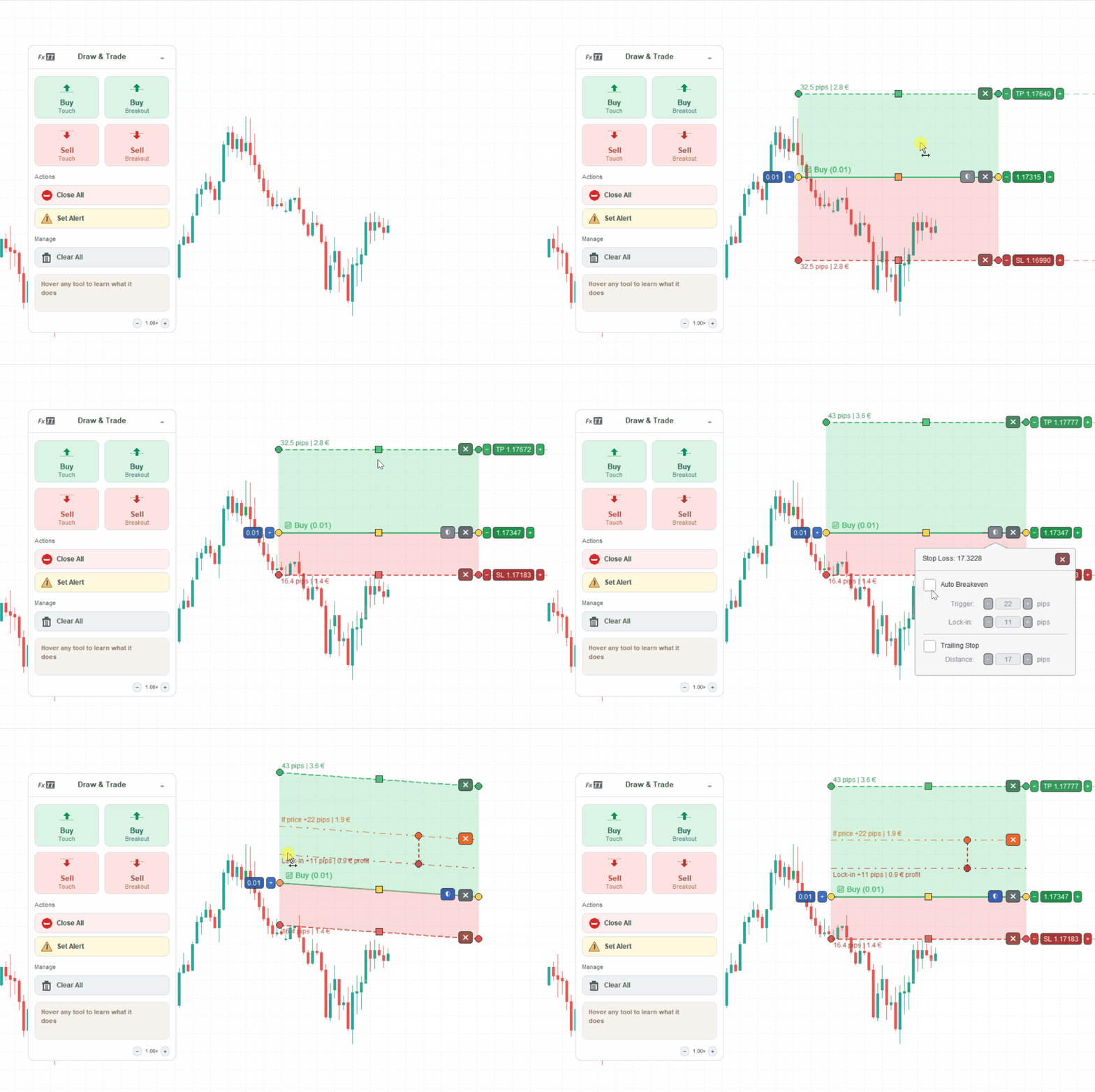
The complete Trendline PRO MT5 workflow, from trendline setup to automatic execution and hands-free trade management.
Your analysis determines the setup. Your strategy determines the parameters. Trendline PRO MT5 guarantees you never fail to execute it.
Not every trendline interaction should open a trade. Sometimes you want to be notified when price reaches a level so you can decide manually whether to act on it.
Trendline PRO MT5 supports alert-only trendlines that trigger a platform notification on the same conditions as their trading counterparts (touch, breakout, pullback, or false breakout) without placing any order. Use these alongside trade trendlines to monitor levels you are still evaluating before committing to automatic execution.
Getting Trendline PRO MT5 running on a live or demo chart is straightforward:
.ex5 file from your account on forextradingtools.eu.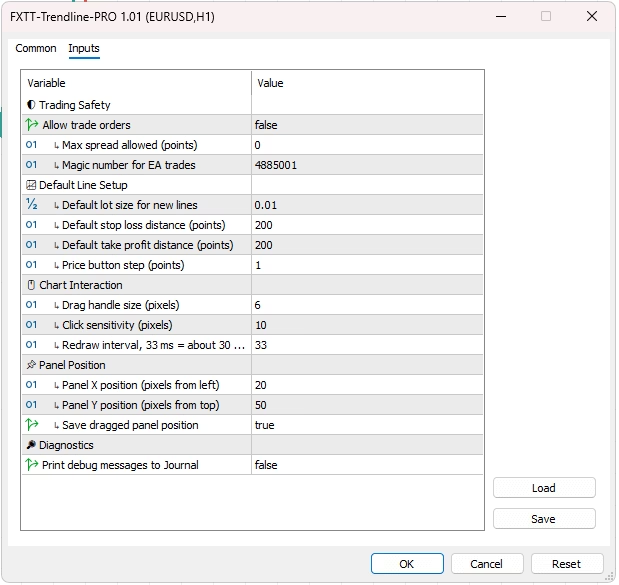
The Trendline PRO MT5 settings window: configure trading safety, default lot size, spread filter, panel position, and DPI scale for high-resolution monitors.
Trendline PRO ships as a native build for each platform: a .ex5 file for MetaTrader 5 and a .ex4 file for MetaTrader 4. Both builds share the same on-chart panel, draggable TP/SL zones, auto-breakeven lines, and all four trigger types covered above.
The MT5 installation steps are covered in the setup walkthrough above. On MT4, the process is nearly identical:
.ex4 file from your account on forextradingtools.eu.MQL4/Experts folder. Right-click the Expert Advisors section in the Navigator panel and select Refresh.One purchase includes both builds, so you can install Trendline PRO on your MT4 and MT5 accounts without buying separately.
Trendline PRO is available for MetaTrader 5 and MetaTrader 4. A one-time purchase includes both platform builds — MT5 and MT4 — plus updates and support for 12 months from purchase. Check the product page for current pricing.
A 60-day money-back guarantee applies: if Trendline PRO does not perform as described on your platform, a full refund is available within 60 days of purchase, no questions asked.
Support and full documentation are available directly through the product page.
Technical Analysis10 free MT5 indicators for trend, structure, momentum, correlation, sessions, and pivots, all free with no trial and no expiry.
 Technical Analysis
Multi-timeframe trading in MT5 — top-down analysis, the best timeframe combinations for every style, workflows, indicators, and common mistakes.
 Technical Analysis
Learn how Asia, Europe, and New York session high and low levels improve trade timing in forex. Free MT5 indicator included with full chart examples.