
Session High Low MT5
Free Session Levels Indicator
Download the free FXTT Session High Low indicator for MetaTrader 5 and instantly mark the high and low of the Asia, Europe, and New York forex sessions on any chart. Color-coded session zones, daily H/L lines, background shading, and one-click toggle buttons — all fully customisable for any trading style.
Free Download
Session high and low levels are critical support and resistance zones that form during each major forex trading session. The FXTT Session High Low MT5 indicator automates professional-level session analysis by tracking institutional price extremes. Institutional traders worldwide reference these levels because they represent the extreme price moves made when the largest volume of capital enters the market.
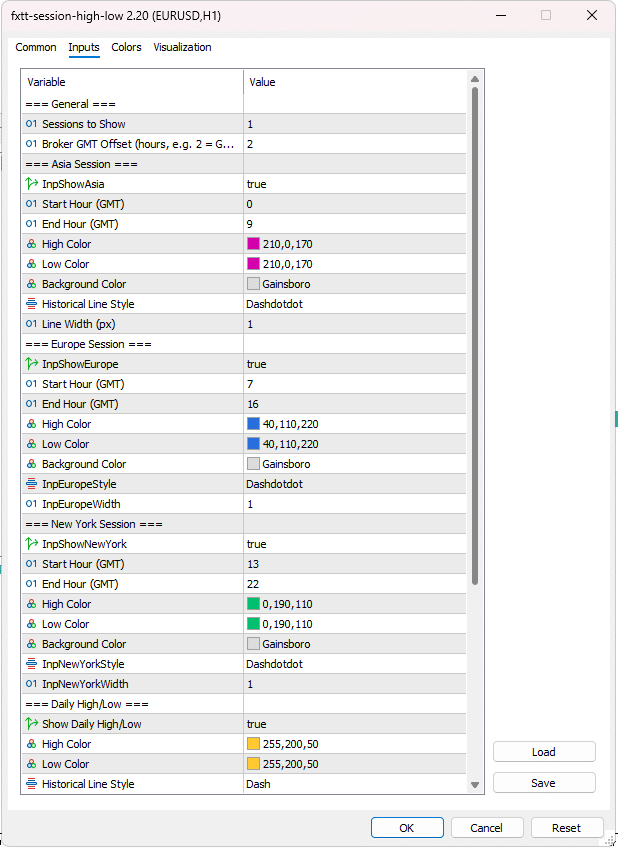
The indicator monitors the three most liquid and volatile trading sessions that drive forex price action: the Asia Session (0:00–9:00 GMT) dominated by Tokyo, Hong Kong, and Singapore banks; the Europe Session (7:00–16:00 GMT) centred on London, the world's largest forex hub; and the New York Session (13:00–22:00 GMT), where the Europe/NY overlap drives the biggest directional moves of the day.
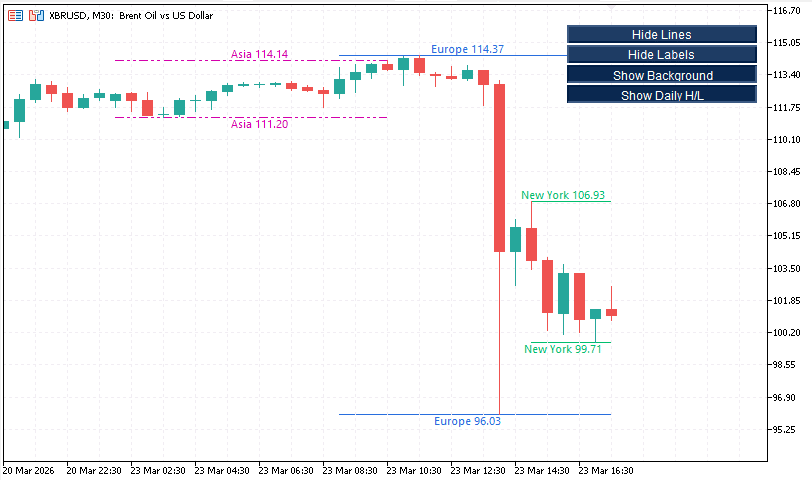
Each session's high and low is displayed as color-coded horizontal lines, making it instant to see where session extremes formed and where traders typically take profits or place stop orders. One-click toggle buttons let you show or hide lines, labels, background shading, and the daily H/L layer without touching any inputs.
The indicator is free and open source. It is lightweight, handles GMT conversion and midnight-wrap detection correctly, and works on any MT5 symbol including forex pairs, gold (XAUUSD), indices, and crypto.
Key Features
- Color-Coded Session LevelsEach session has its own color. Instantly identify which session's levels are on your chart, reducing confusion in multi-timeframe analysis.
- Daily High/Low LinesTrack the past 5 days' daily highs and lows simultaneously with session levels to spot key levels where banks and funds manage risk.
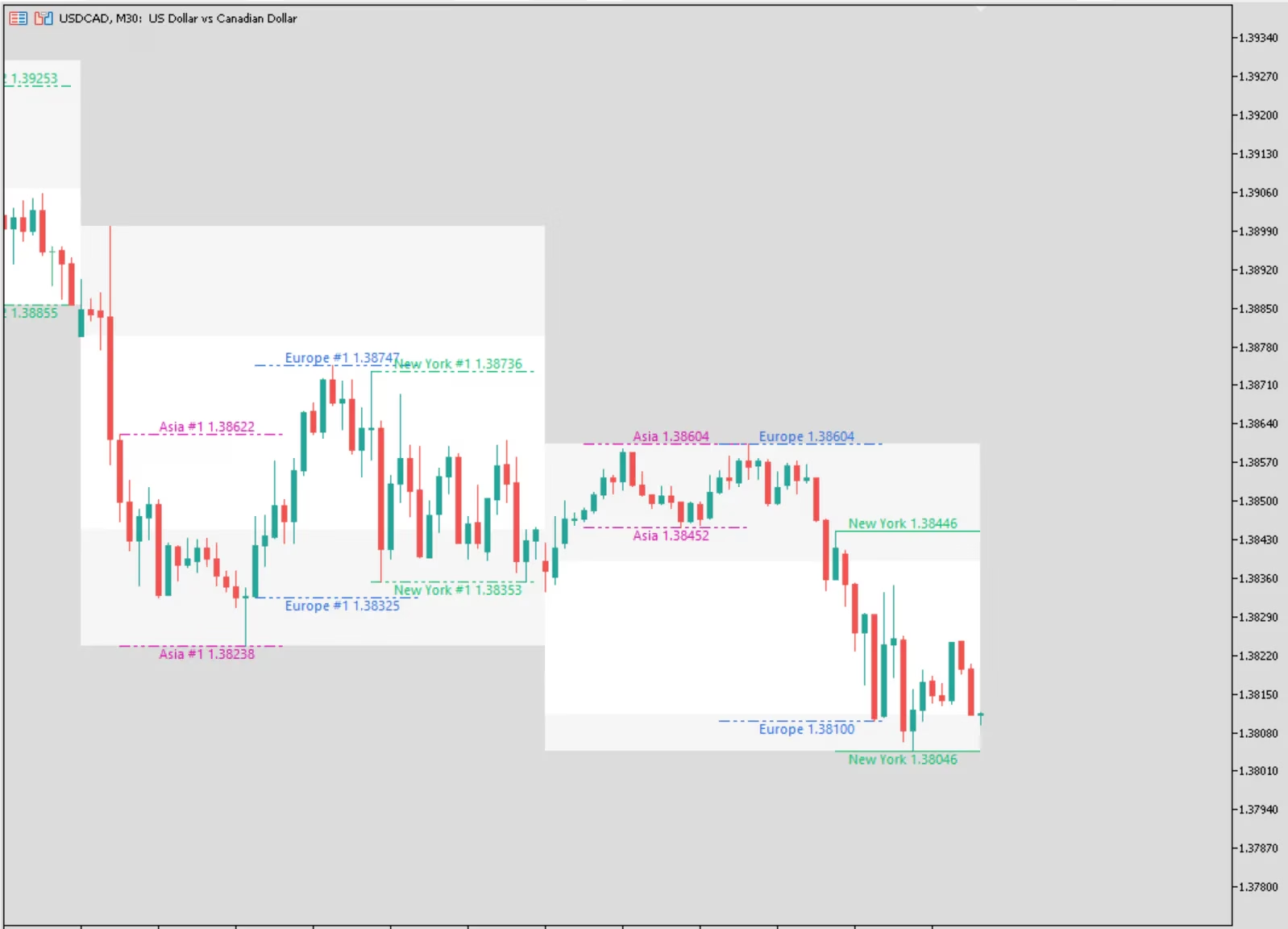
- Background ShadingVisual session zones highlight the exact time each session is active, making it easy to plan your trading day and avoid low-liquidity periods.
- One-Click Toggle ButtonsShow or hide lines, labels, background zones, and daily H/L with instant buttons on your chart — no input reconfiguration needed.
- Customizable Line Styles & ColorsAdjust line width, dash patterns, and session colors to match your trading style and chart aesthetics.
- Adjustable GMT OffsetWorks with any broker's server time. Set the offset once and the indicator automatically converts to GMT for accurate session tracking.
- Historical Session DisplayView the past 5 sessions by default (configurable) to analyze where institutions repeatedly entered and exited the market.
- Lightweight & FastMinimal CPU load. Processes historical bars efficiently without slowing your chart or MT5 platform.
Screenshots


Trader Reviews
Kwame Asante
London and New York session lines are drawn perfectly. Dead simple to use.
Vera Kuznetsova
I trade session breakouts and this is the cleanest tool I've found for it.
Diego Morales
Does the job. Would love an option for Asian session too, but still five stars for the quality.
Write a Review
Frequently Asked Questions
- The most common cause is an incorrect Broker GMT Offset. All session windows are defined in GMT and converted to broker time using this offset. Check your broker's server time in the MT5 status bar and set the offset accordingly. Adjust during DST if your broker observes it.
- The current open session uses a solid line that optionally extends right — it updates tick-by-tick as new highs or lows are set. Completed historical sessions use the configurable historical line style (default: DashDotDot) to make it immediately clear whether a line is live or a past reference.
- Yes. Increase the Sessions to Show input. The maximum is limited by your chart history. On lower timeframes, older data may not be loaded by default — scroll back or increase MT5's history depth setting if older sessions are missing.
- The Background toggle starts pressed so shading is off when the indicator first loads, keeping charts clean. Click the Background button at any time to enable it — the state persists between indicator reloads.
- The Daily H/L layer is independent. It reads from D1 data and draws horizontal lines at each day's high and low. A session breakout that fails to clear the daily high carries very different weight than one that does. Toggle it separately with the Daily H/L button.
- Yes. The indicator scans bar timestamps and groups consecutive in-session bars into occurrences. Weekend gaps are handled naturally since there are no bars during the gap.
- Yes. Session detection is entirely time-based and works on any MT5 symbol — XAUUSD, US30, NAS100, BTCUSD, and all forex pairs. The session windows remain meaningful for gold and indices as they are heavily influenced by London and New York session activity.
- No. The buttons are standard OBJ_BUTTON chart objects and do not interfere with EAs. An EA would need to explicitly filter for button names (SHLB_LINES, SHLB_LABELS, SHLB_BG, SHLB_DAILY) to interact with them.
- Yes. The indicator uses unique object-name prefixes (SHL_ and SHLB_) to avoid naming conflicts with other tools on the same chart.
- An MT4 version is not currently available. This indicator is designed specifically for MetaTrader 5.
Setup Guide
Download the zip
Click the download button on this page and save the .zip file to your desktop or downloads folder.Extract the file
Right-click the zip and select Extract All. You will find a FxTT_SessionHighLow.ex5 file inside.Open MT5 Data Folder
In MetaTrader 5, open File → Open Data Folder, then navigate to MQL5 → Indicators and paste the .ex5 file there.Refresh the Navigator
Back in MT5, press Ctrl+N to open the Navigator panel. Right-click Indicators and select Refresh.Attach to chart
Double-click the indicator in the Navigator or drag it onto any chart to attach it.Set your GMT offset
In the inputs window, set the Broker GMT Offset to match your broker's server time. Adjust for DST if your broker observes it.Save as template (optional)
Right-click the chart → Template → Save Template with a descriptive name. Apply that template to any new chart instantly so you never need to reconfigure from scratch.
Changelog
- Added Daily High/Low layer using D1 data with independent color, style, and width settings
- Added four on-chart toggle buttons: Lines, Labels, Background, Daily H/L
- Background toggle starts pressed (shading hidden by default on load)
- Daily labels positioned at horizontal midpoint of each day's range
- Button panel: configurable corner, X/Y offset, text color, and background color
- Buttons collapse to zero size when Show Panel Buttons is false (toggle states preserved)
- Added configurable chart label font and font size
- Added Extend Current Session Lines Right option
- Improved midnight-wrap session detection
- Initial release.
- Asia, Europe, and New York session high/low lines
- Per-session color, line style, and line width
- Background shading rectangles per session
- On-chart price labels with session name and price
- Configurable lookback (sessions to show)
- Broker GMT offset adjustment
More Tools

Free Download
Free tools are analysis aids and utilities. They do not guarantee trading results. Always test in a demo account before applying to live markets.