
 Trading Education
What Is a Pip in Forex? Pip Value
A pip is forex's standard price move. Find it in a quote, work out what it's worth in your account currency, then check it with the pip-value tool.
Slippage is the gap between the price you expect and the price your forex order fills at. It differs from spread and depends on available liquidity.
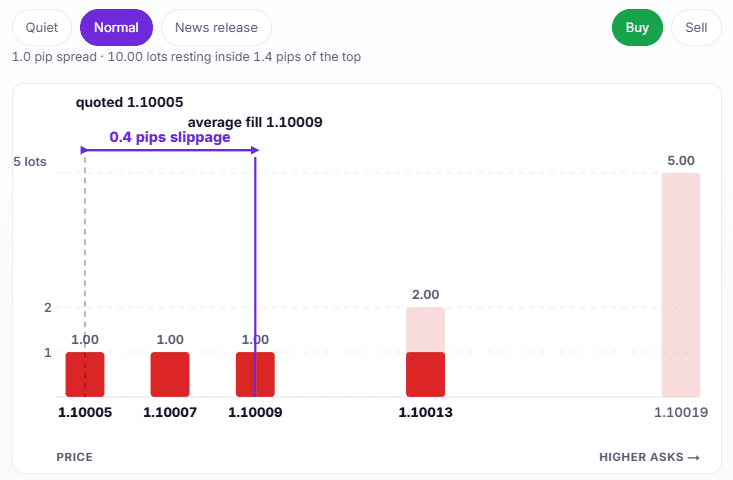
Slippage is the difference between the price you asked for and the price your order actually received. You click buy on EUR/USD at 1.10000, the confirmation reads 1.10004, and those 0.4 pips are slippage.
It has no rate and no line on your statement. Some fills come back worse than you asked for, some come back better, and the size of the gap depends on how much can be traded at the price you wanted.
About the author. I am Carlos Oliveira. I build trading tools for MetaTrader and run ForexTradingTools.eu. The prices and fills below are worked examples on a 1.00 lot EUR/USD position, where one pip is worth $10. These figures will not predict the fills on your account. Check your account history.
Contents
A market order asks to buy or sell at the best price available when your broker receives it. It does not lock the price on your screen.
The price shown is the best price currently available to you. There may be limited size at that price. If your order needs more, part of it can fill at worse prices. Your final price is the average of all those fills.
On a 1.00 lot of EUR/USD, a 0.4 pip gap costs $4. A 2.5 pip gap costs $25. The fill changes your entry even if the price does not move after it.
The spread appears before you click. You can decide whether the current price is worth taking.
Slippage appears after you decide. Your order travels to the server. By the time it arrives, the quote may have changed.
1.00 lot, before you send the order. This example fills 0.8 pips, or $8, above the quoted ask. You see that difference only after the trade.| Spread | Slippage | |
|---|---|---|
| When you see it | Before you click | After the fill |
| What sets it | The bid-ask gap your broker quotes | How much size is available at your price |
| Can it help you | No, you always cross it | Yes, a fill can come back better |
| Where it shows up | Market Watch, before the trade | The deal price in your history |
Both affect the cost of opening or closing a trade. You see the spread before you send the order. You learn slippage from the fill.
The chart below uses a simplified price queue. Bars show the lots available at each price, and your order fills from the left until complete. One line marks the quoted price, the other your average fill — the gap between them is slippage.
Prices run left to right, and the solid part of each bar shows the size your order actually filled at that level.
1.0 pip spread · 10.00 lots resting inside 1.4 pips of the top
The order used all the size available at the displayed price, then filled at higher available prices. A thinner book moves the same order farther from the quote. If the market moves in your favor before the fill, you receive a better price. That is positive slippage.
Try a quiet market with 1.00 lot. Two lots rest at the best price, so the whole order fills in the first bar. The slippage card reads 0.0 pips, or $0.00. Small orders can get the displayed price during liquid hours.
Increase the size. The first bar empties, then the order reaches the second and third, and the fill line moves right of the quote. Three lots in a normal market average 0.2 pips, or $6. In the news-release setting, each bar holds less size and the gaps widen. The same three lots average 4.0 pips, or $120. Ten lots empty every displayed bar and average 11.7 pips.
Select the max-deviation box. A third line marks your cap. In the simulator, a fill inside the cap completes and one beyond it is refused. At 20 points, the news-release order is refused. The setting makes the choice clear: accept a worse price or risk missing the position.
An order can move away from the price you saw because it is large, it takes time to reach the server, or price gaps before it arrives.
First, size. If you ask for more than the best price can absorb, the remainder fills at worse prices.
Time matters too. Your order takes a moment to reach the server, while quotes can change many times each second. In a busy market, price can cross several levels before the order arrives.
Price gaps make it worse. After a rate decision or at the Sunday open, price can jump from one level to another with no trading between them. An order in that empty space fills on the far side. A stop loss can close farther from its level than you set.
Buying at a worse price than you asked for is negative slippage. Buying at a better one is positive slippage. Both happen because the price at execution was not the price at the click.
1.00 lot of EUR/USD makes one pip $10, so these two-pip differences equal $20. The buy and sell use the same requested and fill prices. The trade direction decides which fill helps.For a buy, a fill above your requested price costs you and a fill below improves your entry. For a sell, the direction reverses. Review positive and negative fills together before blaming your broker.
Order types differ in what they promise. No order type promises both a price and a fill.
Execution expected
Expected to trade · price not capped
Market orderThe broker tries to fill it at the available price. Under Market Execution, you accept that price in advance.
Stop orderIt triggers the corresponding market order, so it may fill at your level or worse. The broker can still reject it if that market order cannot go through.
Expected to trade · price capped
Empty. No order type guarantees both an execution and a price cap.
May never trade · price not capped
Empty. This combination offers neither a price cap nor an expected fill.
May never trade · price capped
Limit orderExecutes at the price you specified or better. If the market never comes to you, nothing happens.
Stop-limit orderPlaces a limit order once the stop triggers, so the price stays capped. It can miss the move if price does not return to the limit.
Price capped
A market order is sent for immediate execution at the best available price, not a guaranteed price. A limit order sets the worst price you will accept. MetaTrader executes it at the specified price or better, and the terminal documentation says a fill is not guaranteed. A stop order sends the corresponding market order once it triggers, so the fill may be at the specified price or worse. A stop-limit order places a limit order at the trigger. It caps the price but may not fill.
MetaTrader 5 also has a Deviation field. It is set in points, not pips. On a five-decimal EUR/USD quote, 10 points is one pip. It works only in Instant and Request execution, where the server can refuse an order that has moved past your tolerance and offer a new quote. Market execution ignores it. Check your account's execution model before you rely on the setting.
A scheduled release can reduce the size available at each price. The spread widens and fewer lots sit at each level. An order that filled at one price ten minutes earlier may then cross several price levels.
Our free News Calendar MT5 plots high-impact events directly on your chart with impact and currency filters, so you can see a release like this coming and avoid entering right into the exact liquidity gap described above.
The same risk appears at the daily rollover, on exotic pairs, and just after the Sunday open. Avoid those windows if your entry needs a specific price.
Your account history has the data you need.
A sample of twenty or thirty trades exposes a pattern. One bad fill does not. An Expert Advisor can log the same comparison automatically from the deal price and the requested price.
Testing needs a warning. The MetaTrader Strategy Tester can emulate network delay. Its No Delay setting fills every order at the requested price without requotes. The documentation calls that ideal execution. A backtest shows what the strategy did with clean fills. It does not show how your broker will fill it. This matters most for news strategies and scalpers who aim for a few pips.
A market order cannot guarantee zero slippage. You can make it smaller and less common.
Trade liquid pairs during active hours, when more size is available at each price. Keep your order small enough to fit near the top of the book. Break a large position into smaller tickets. Use a limit order when the trade idea lets you wait for a price. Avoid the first seconds after a scheduled release. If your account uses Instant execution, set Deviation to the largest move you will accept.
Then measure your own fills. If positive and negative slippage both appear, prices may simply be moving while your order travels. If the results are consistently negative, ask your broker why. A table of twenty trades gets more attention than a complaint about one.
No. A fee has a rate you can look up. Slippage is a price outcome, and its size depends on the liquidity available when your order arrives. Spread and commission are the charges; see the spread and commission comparison for those.
The spread is the bid-ask gap you can see before you trade. Slippage is the difference between the price you expected and the price you received, which you only learn afterwards.
No. A fill better than your requested price is positive slippage. Negative fills feel more memorable, so check your history for both.
No. A stop order sends a market order when it triggers, so it executes at your level or worse. During a price gap, the first available price can be some distance beyond the stop.
You can set the Deviation field in points. It caps how far the price may move before the server refuses the order. It applies only to Instant and Request execution, and it does not remove slippage. It may reject an order instead of filling it beyond your tolerance.
On a major pair in active hours with a small order size, it may be a fraction of a pip. Around a scheduled release or on a thin pair, it can be several pips. Your deal history shows the result for that pair and order size.
Partly. The tester can emulate network delay, and the No Delay setting fills at the requested price. It does not reproduce your broker's execution, so compare the test against your own deal history once you have traded the strategy small.
Trading EducationA pip is forex's standard price move. Find it in a quote, work out what it's worth in your account currency, then check it with the pip-value tool.
 Trading Education
The spread in forex is the gap between the bid and the ask price. See what it costs, why it widens, and how to check it, on an interactive bid-ask chart.
 Trading Education
Forex swap is the overnight financing charge or credit on an open position. See why long and short differ, when triple swap lands, and try it yourself.